


Participant
March 14, 2024
Answered

Money refund Please

  • March 14, 2024
  • 3 replies
  • 462 views

Hello everyone, today I want to say that I made a serious mistake, and that is that I left my card in my account, and apparently, Adobe Stock started charging about 4 months ago, I have not spent any credit or anything of the 4 months, I would like my money back please.


For those who don't know, you can't cancel the plan you choose whenever you want, because when I decided to cancel my plan or remove the renewal, it wouldn't let me, and also asked me to pay a high cost for the simple fact of canceling the plan early. It seems very unfair to me that the politics force you to maintain a plan or you pay to take it away, and without your credits yet...

I would like you to help me please


Another Thing ive noticed is that apparently your credits dont stack!

if you did not spend your 500 credits in a month, they will not a accumulate with the other 500 that they will give you, they will be lost! that doesnt seem fair to me, honestly!
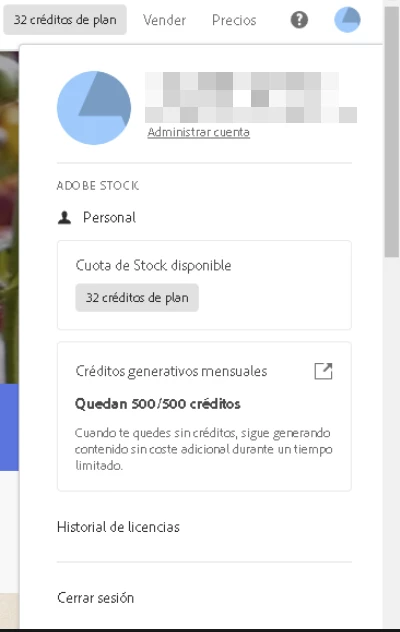
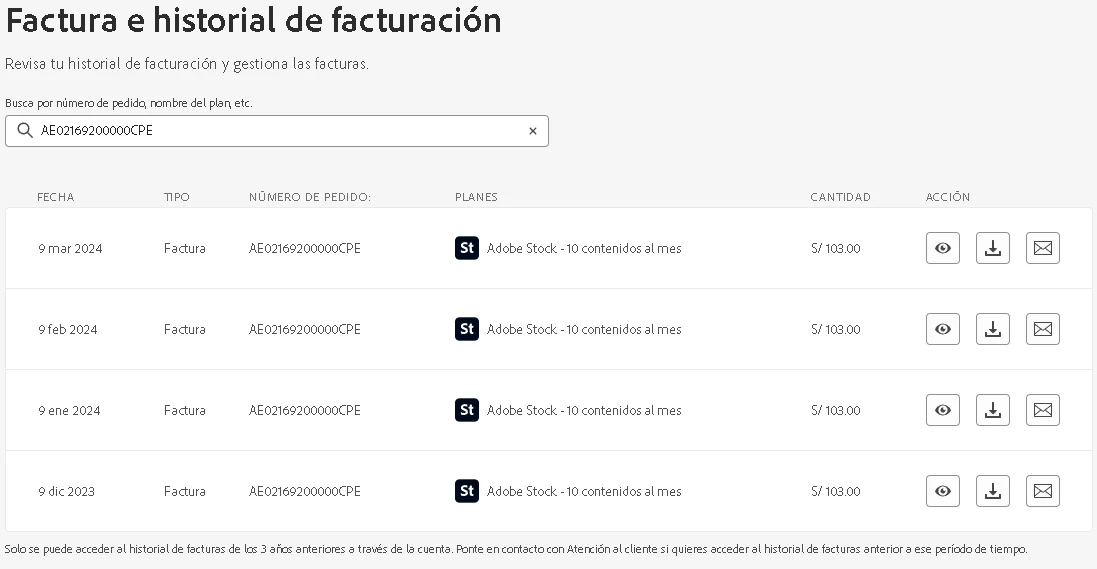


Im waiting for the experts to help me, thanks.


[Moderator deleted private information. Please do not post private information like e-mails and phone numbers]

This topic has been closed for replies.
Correct answer Abambo

You did not cancel after the initial 30 free days. But if you had not used the subscription, you should have 40+ credits in your account. Or you have only 30+ credits?


Adobe customer care can be contacted by beginning a secure chat session at https://helpx.adobe.com/contact.html?rghtup=autoOpen. Pop-up blockers need to be disabled, you need to accept cookies! If the chat window fails to open, or is non-responsive, use a different device and/or browser to start the interaction.

For support via Twitter:
https://twitter.com/AdobeCare

(see also here: https://community.adobe.com/t5/creative-cloud-services/how-to-contact-adobe-support/td-p/11875703 or here
https://community.adobe.com/t5/account-payment-plan/how-to-contact-adobe-support/td-p/11843852)

Important: Adobe does NOT contact you unsolicited by e-mail or direct message. If you get contacted by direct message from a person, claiming to be an Adobe employee, look at that profile and check if they bear the “Adobe Employee” marking under their name. Adobe support does not use Skype to give you support.
If in doubt, ask the forum.

3 replies

Participant
March 15, 2024
If this e-mail come from in my QQ email address or come from gmail address ? ? Or come from iCloud mail address ??
Peiyun li
Jill_C
Community Expert
Community Expert
March 15, 2024

What email are you referring to? There's certainly no way for anyone in this forum to know where you're receiving your emails....

Jill C., Forum Volunteer
Abambo
Community Expert
AbamboCommunity ExpertCorrect answer
Community Expert
March 14, 2024

You did not cancel after the initial 30 free days. But if you had not used the subscription, you should have 40+ credits in your account. Or you have only 30+ credits?


Adobe customer care can be contacted by beginning a secure chat session at https://helpx.adobe.com/contact.html?rghtup=autoOpen. Pop-up blockers need to be disabled, you need to accept cookies! If the chat window fails to open, or is non-responsive, use a different device and/or browser to start the interaction.

For support via Twitter:
https://twitter.com/AdobeCare

(see also here: https://community.adobe.com/t5/creative-cloud-services/how-to-contact-adobe-support/td-p/11875703 or here
https://community.adobe.com/t5/account-payment-plan/how-to-contact-adobe-support/td-p/11843852)

Important: Adobe does NOT contact you unsolicited by e-mail or direct message. If you get contacted by direct message from a person, claiming to be an Adobe employee, look at that profile and check if they bear the “Adobe Employee” marking under their name. Adobe support does not use Skype to give you support.
If in doubt, ask the forum.

ABAMBO | Hard- and Software Engineer | Photographer
Participating Frequently
March 14, 2024

Hey Alina Mirian36012137dep4! 


Only the Costume Support can help you with this problem. Simply go to the Adobe website for your country and click on the blue speech bubble at the bottom right. Then you first talk to a bot until you tell it that you want to talk to an employee.