


Participant
August 14, 2023
Answered

My Licensed images no longer available

  • August 14, 2023
  • 3 replies
  • 452 views

I have the same problem. Deleted Cache in Browser before, reloged with the right ID.

All Licences between 05.10.2018 and 10.05.2023 are not visible and have gone. My bills in the Admin-Panels are still there.

This looks like a mistake in the System ...
This topic has been closed for replies.
Correct answer Konzepttreu

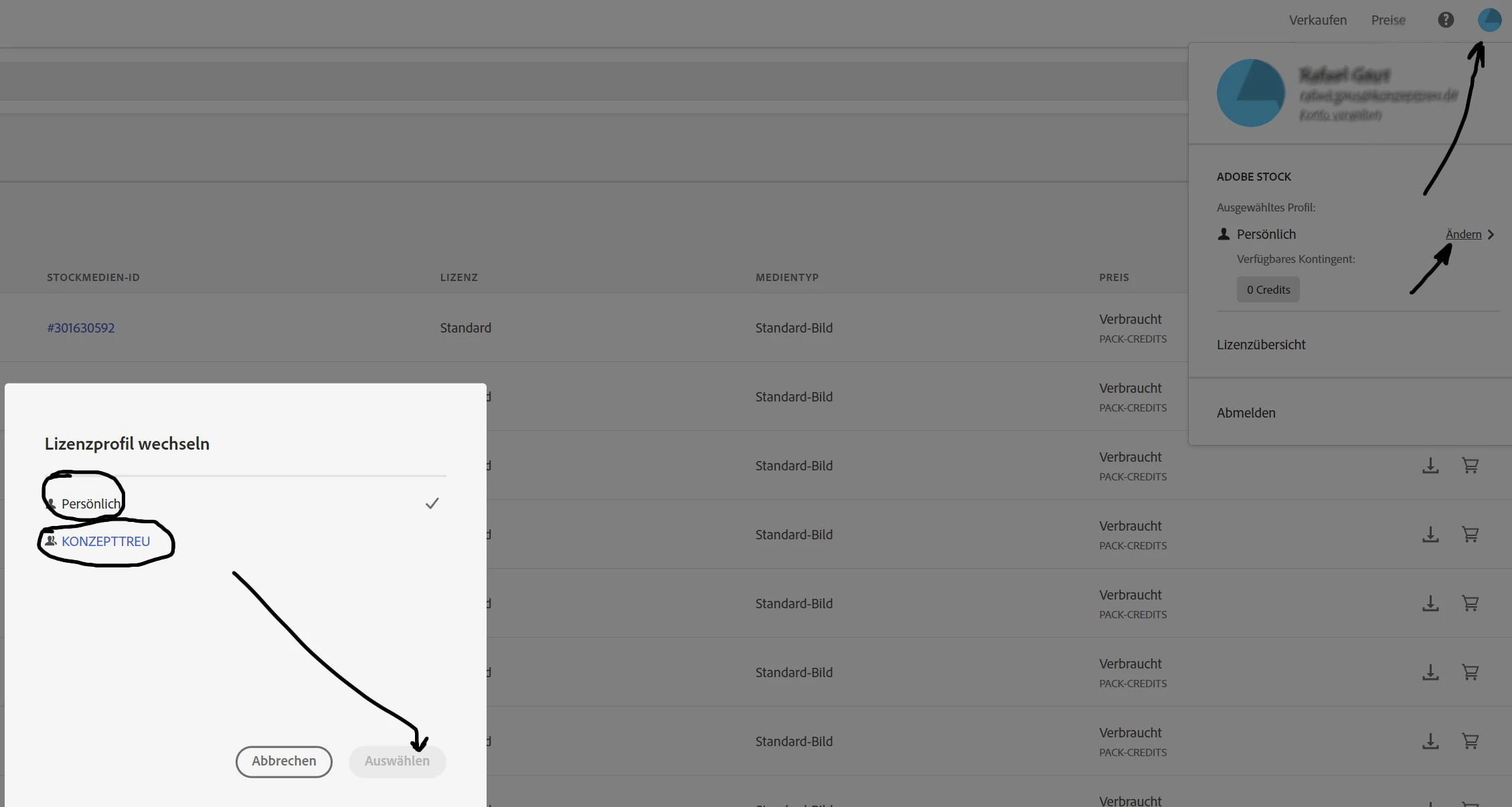
I could solve the problem in the meantime. In the screenshot you can see that the license overview is no longer complete, but account-related. This seems to be new? My missing licenses are now in two categories (company and personal).

3 replies

Participant
August 14, 2023

@Abambo

My last credit is still active (I usually buy 5 of them). But I'm not talking about credits, I'm talking about licensed images for projects with clients, that I had already purchased with credits. If someone with rights could look into my account, they would see right away that something went hugely wrong. As I said, every image between the dates mentioned from 2018 to 2023 (starting on the 2nd page in the list) is no longer licensed or listed under my licenses. It feels like someone has deleted all my information between the last five years and I have purchased many images. If someone with rights were to look into my invoices for the last few years and how many credits I've bought and how many of them I've used .... well - simply put - I really need support in this case.

Abambo
Community Expert
Community Expert
August 19, 2023

@Konzepttreu 

If it is an individual account: contact Adobe customer care (see later in this message).

If it is a business account: please contact Adobe customer care via the admin console https://adminconsole.adobe.com/support (you need to be a plan administrator to do so).


Contacting support with an individual account: Adobe customer care can be contacted by beginning a secure chat session at https://helpx.adobe.com/contact.html?rghtup=autoOpen. Pop-up blockers need to be disabled, you need to accept cookies! If the chat window fails to open, or is non-responsive, use a different device and/or browser to start the interaction.


For support via Twitter:
https://twitter.com/AdobeCare

(see also here: https://community.adobe.com/t5/creative-cloud-services/how-to-contact-adobe-support/td-p/11875703 or here
https://community.adobe.com/t5/account-payment-plan/how-to-contact-adobe-support/td-p/11843852)


Important: Adobe does NOT contact you unsolicited by e-mail or direct message. If you get contacted by direct message from a person, claiming to be an Adobe employee, look at that profile and look, if they bear the “Adobe Employee” marking under their name. Adobe support does not use Skype to give you support.


If in doubt, ask the forum.

ABAMBO | Hard- and Software Engineer | Photographer
KonzepttreuAuthorCorrect answer
Participant
August 21, 2023

I could solve the problem in the meantime. In the screenshot you can see that the license overview is no longer complete, but account-related. This seems to be new? My missing licenses are now in two categories (company and personal).

Abambo
Community Expert
Community Expert
August 14, 2023

@Konzepttreu ,


Are you certain that your credits did not expire? Credits expire after a year.

ABAMBO | Hard- and Software Engineer | Photographer
Participant
August 14, 2023

Hello Abambo,

individual and most of the time "Credit-Packs" in my case. If i look into my different Libraries, i can see some of the pictures, but now no more licenced.