Participant
May 4, 2022
Answered

My trial period for Adobe Stock expired and I forgot to cancel it.

  • May 4, 2022
  • 2 replies
  • 292 views

My trial period for Adobe Stock expired, I forgot to cancel it and have incurred a monthly charge. How can I find out how many assets I downloaded and if I cancel the plan now will I still be able to download any assests 'owed' to me?

Thank you.

This topic has been closed for replies.
Correct answer Abambo

At https://stock.adobe.com while signed in, you will see your available quota:
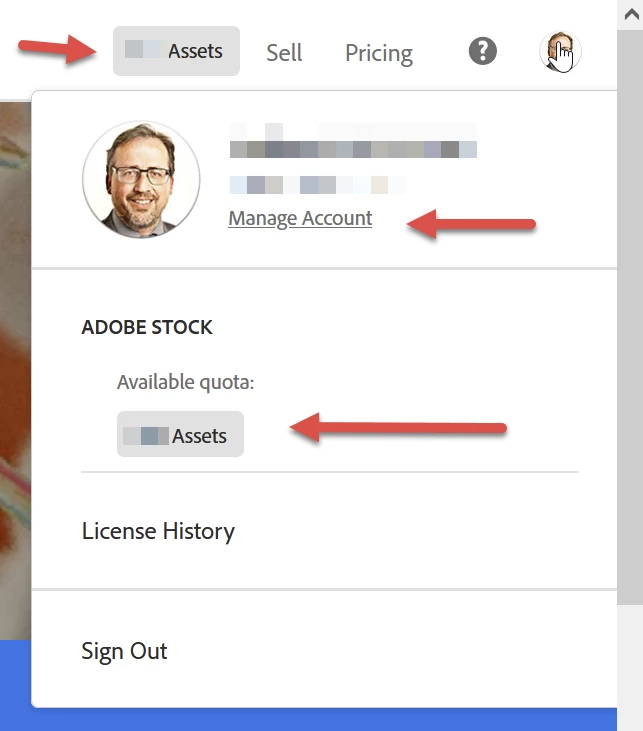
As the site is responsive, the upper information may not be available. However, by clicking your avatar, you will be able to see the available quota.


By clicking "Manage Account" you can manage your subscription. When cancelling, you will lose unused assets, licensed items will stay. Early cancellation will trigger an "early cancellation fee" of half of the remaining due, except for the first 14 days of your first paid month. For cancelling, see here: Cancel your Adobe Stock membership.


You may also contact Adobe customer support. Adobe customer care can be contacted by beginning a secure chat session at https://helpx.adobe.com/contact.html?rghtup=autoOpen. Pop-up blockers need to be disabled! If the chat window fails to open, or is non-responsive, use a different device to start the interaction.
Support phone numbers may be found here: https://helpx.adobe.com/contact/phone.html. Please note that phone charges may apply.

(see also here: https://community.adobe.com/t5/creative-cloud-services/how-to-contact-adobe-support/td-p/11875703 or here
https://community.adobe.com/t5/account-payment-plan/how-to-contact-adobe-support/td-p/11843852)


2 replies

Abambo
Community Expert
AbamboCommunity ExpertCorrect answer
Community Expert
May 5, 2022

At https://stock.adobe.com while signed in, you will see your available quota:

As the site is responsive, the upper information may not be available. However, by clicking your avatar, you will be able to see the available quota.


By clicking "Manage Account" you can manage your subscription. When cancelling, you will lose unused assets, licensed items will stay. Early cancellation will trigger an "early cancellation fee" of half of the remaining due, except for the first 14 days of your first paid month. For cancelling, see here: Cancel your Adobe Stock membership.


You may also contact Adobe customer support. Adobe customer care can be contacted by beginning a secure chat session at https://helpx.adobe.com/contact.html?rghtup=autoOpen. Pop-up blockers need to be disabled! If the chat window fails to open, or is non-responsive, use a different device to start the interaction.
Support phone numbers may be found here: https://helpx.adobe.com/contact/phone.html. Please note that phone charges may apply.

(see also here: https://community.adobe.com/t5/creative-cloud-services/how-to-contact-adobe-support/td-p/11875703 or here
https://community.adobe.com/t5/account-payment-plan/how-to-contact-adobe-support/td-p/11843852)

ABAMBO | Hard- and Software Engineer | Photographer
Legend
May 5, 2022

- The subscription gives you credits

- Credits last 12 months, then disappear

- Credits are all lost if you cancel (the special price comes from the commitment, you cannot use a subscription as a cheap way to get credits then stop and spend them at your leisure)

- When you spend credits you get assets

- Assets last forever 

- Download assets before you cancel !!

Participant
May 23, 2022

Thank you very much for this information.  Kind regards.
