Gabrielle Madsen
Known Participant
April 29, 2019
Answered

Non-Conform Error in Lightroom Before Publish

  • April 29, 2019
  • 1 reply
  • 607 views

Hi Everyone!

I repeatedly receive this error message on original artwork/photography illustrations.
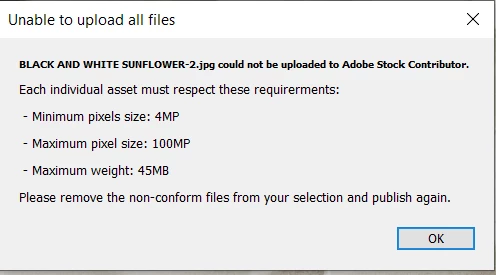
There is some confusion about the actual file sizes as I have had them from Photoshop to Lightroom and back and forth numerous times.  This morning I was saving them out as PNG.  Is this the problem perhaps?  I will triple check a single file for size.

Thank you for any assistance

This topic has been closed for replies.
Correct answer Abambo

Thank you for taking the time to provide such helpful feedback!

And yes the problems were most likely due to pixel sizes being lower than required.

I will continue to learn


You're welcome. If the pixel size does not give the required 4Mp than there is no need to try to upload. And the first cameras are out delivering a size bigger than 100Mp.

1 reply

Brad Lawryk
Legend
April 29, 2019

Stock will not accept .png files. Try converting to .jpg.

Gabrielle Madsen
Known Participant
April 29, 2019

Thank you,

I will double check this, but LR seems to be glitching even after converting to jpg.  I will rename and retry.

Brad Lawryk
Legend
April 29, 2019

Also try avoiding spaces or special characters in your file names.