Participant
July 31, 2025
Answered

Please HELP - YouTube has rejected my claim dispute for an audio file I purchased on Adobe Stock

  • July 31, 2025
  • 3 replies
  • 153 views

Hello,

I puchased two audio files on Adobe Stock (content ID 331406412 and content ID 331461040) and used it on a video that I published on my monetised YouTube channel.

YouTube as usual raised copyright claims for these audio contents when I uploaded the video and I submitted a claim dispute using the standard procdure that I have used many times and has always worked.

In this case though, they have reject my claim dispute.

I checked on Adobe earlier and now these two audio contents are no longer available but the Adobe Terms and Conditions state that the licences you purchase are perpetual. And anyway I couldn't have known that these audio files are no longer available on Adobe Stock.

I can appeal the rejection but YouTibe says I risk a copyright warnign if my appeal is rejected too.

Can you please advise? I am currently losing money as my video cannot be monetised due to this audio content that I regularly purchsed on Adobe Stock.

Kind regards,
Laura Mattei

  

Correct answer Abambo

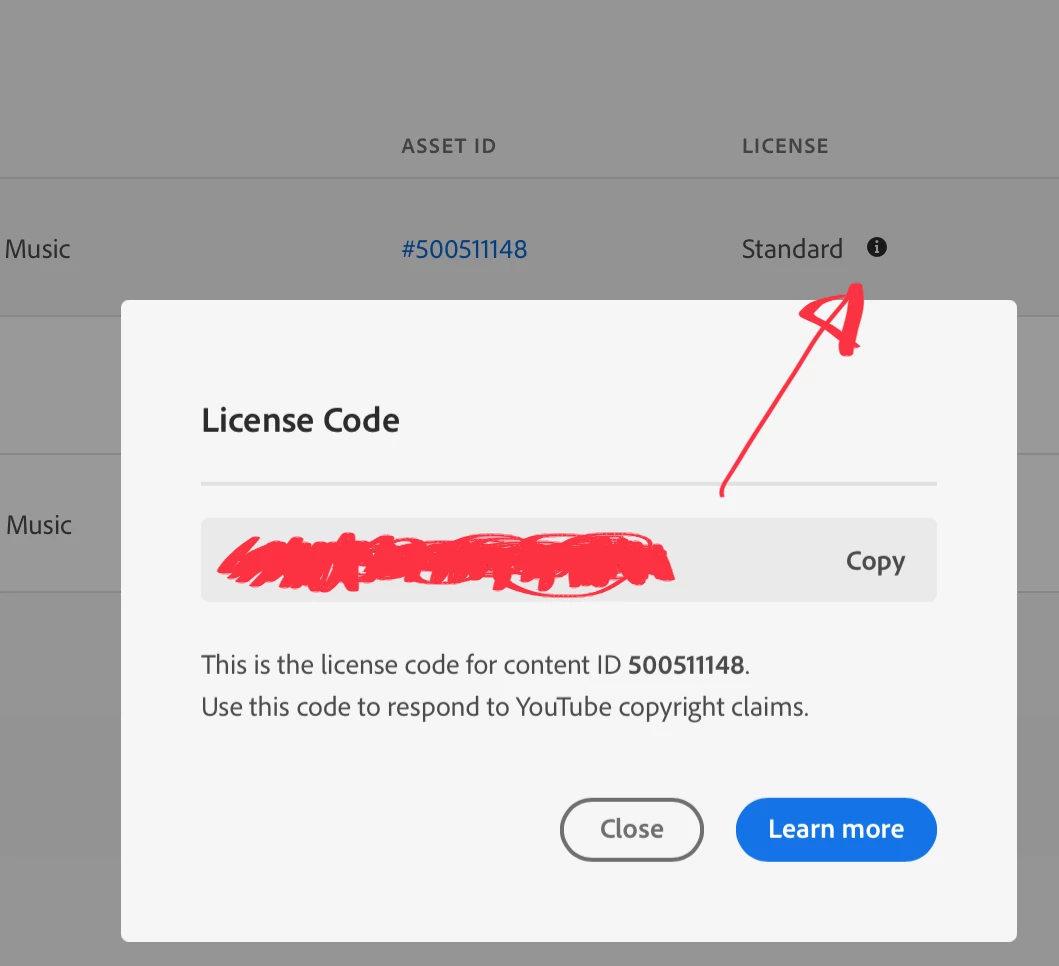
Purchased licences on Adobe stock are perpetual, even if the contributor draws their asset from stock. But for YouTube, you need to follow a specific procedure to avoid copyright strikes: 

You get that code, however, only for active assets. Assets that got withdrawn are no more able to generate that licence code, so it's strongly adviced to safeguard this code with your asset. 


There is very little that Adobe can do for you, as this is an internal YouTube issue, and even worse, some contributors change the names of their assets, so that it is very difficult for you to check which asset is concerned.

3 replies

Abambo
Community Expert
AbamboCommunity ExpertCorrect answer
Community Expert
August 10, 2025

Purchased licences on Adobe stock are perpetual, even if the contributor draws their asset from stock. But for YouTube, you need to follow a specific procedure to avoid copyright strikes: 

You get that code, however, only for active assets. Assets that got withdrawn are no more able to generate that licence code, so it's strongly adviced to safeguard this code with your asset. 


There is very little that Adobe can do for you, as this is an internal YouTube issue, and even worse, some contributors change the names of their assets, so that it is very difficult for you to check which asset is concerned.

ABAMBO | Hard- and Software Engineer | Photographer
Nancy OShea
Community Expert
Community Expert
July 31, 2025

[Moderator moved from Stock Contributors to Stock.]


That's very frustrating. I urge you reach out to Adobe Customer Care about your purchase. At a minimum, they should give you a credit. But to get back into good graces with YouTube, you may have to replace the flagged media with new audio files.


Instagram: https://www.instagram.com/adobecustomercare/

Twitter/X:  https://x.com/adobecare 


I hope that helps & best of luck!


Nancy O'Shea— Product User & Community Expert
kglad
Community Expert
Community Expert
July 31, 2025

in the future, to find the best place to post your message, use the list here, https://community.adobe.com/

p.s. i don't think the adobe website, and forums in particular, are easy to navigate, so don't spend a lot of time searching that forum list. do your best and we'll move the post (like this one has already been moved) if it helps you get responses.


<"moved from using the community bugs">