
Participating Frequently
April 2, 2018
Answered

Poor Image Quality

  • April 2, 2018
  • 1 reply
  • 708 views

Not sure how to report an image.  This should be an interface option off of an images purchase page.

Image: Night scene of downtown Toronto - Buy this stock photo and explore similar images at Adobe Stock | Adobe Stock

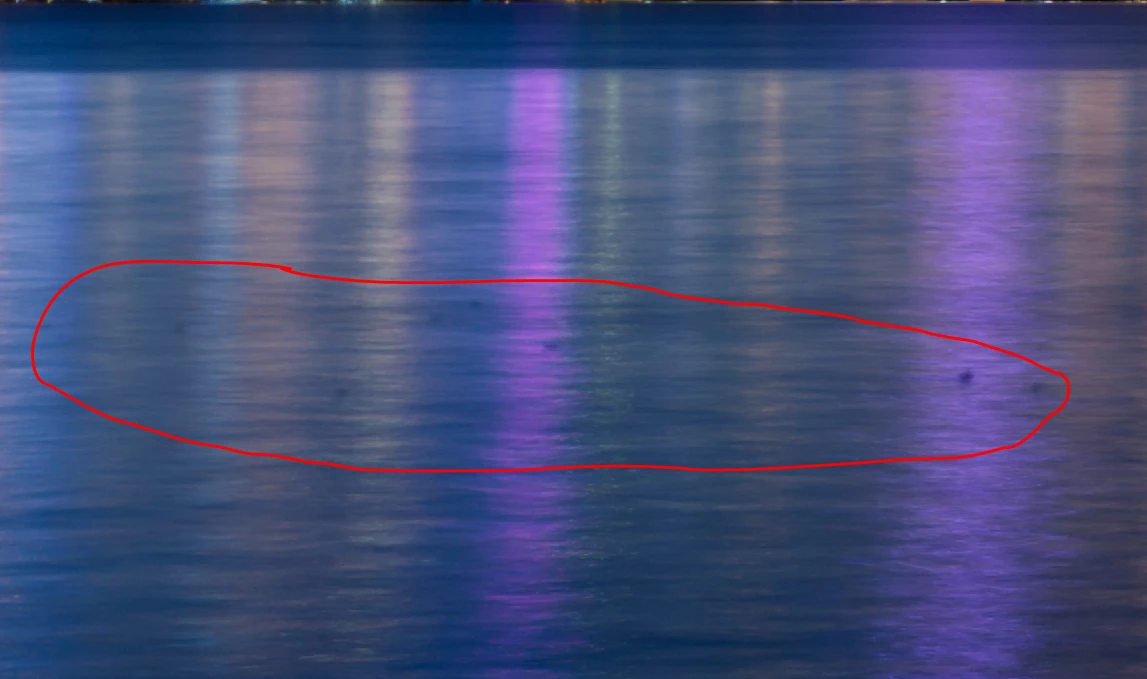
Poor quality.  There is lense dirt that hasn't been cleaned along the bottom left of the image along the water.  This is poor QA on photographers and your part.

The image is generally soft focus.  Unhappy with this purchase.

P.
    This topic has been closed for replies.
    Correct answer twaritar3263062

    Hi Paul,

    Are you referring to the spots as shown in the screenshot below? If not, can you please share a screenshot of the spots you see in the image?

    Regards

    Twarita

    1 reply

    twaritar3263062
    Participating Frequently
    April 2, 2018

    Hi Paul,

    Sorry to hear that you are facing troubles with Stock files.

    I would like to know a few more details from you so that I can help you better.

    1.First of all, please mention the zoom percentage at which you are viewing the above-mentioned file?.

    2.Which part of the image is showing as pixelated when zooming in?

    3. Which application are you using this file with? Are you opening it in Illustrator or Photoshop?

    Regards

    Twarita

    Participating Frequently
    April 2, 2018

    You can see the spots from the dirt on the lens or CCD without zooming in.  You'll see them whether you open it in a default image viewer or Photoshop.  It was opened by us in Photoshop.  The soft focus can be seen at 100% zoom or if printed.

    twaritar3263062
    twaritar3263062Correct answer
    Participating Frequently
    April 2, 2018

    Hi Paul,

    Are you referring to the spots as shown in the screenshot below? If not, can you please share a screenshot of the spots you see in the image?

    Regards

    Twarita