


Participant
January 15, 2023
Answered

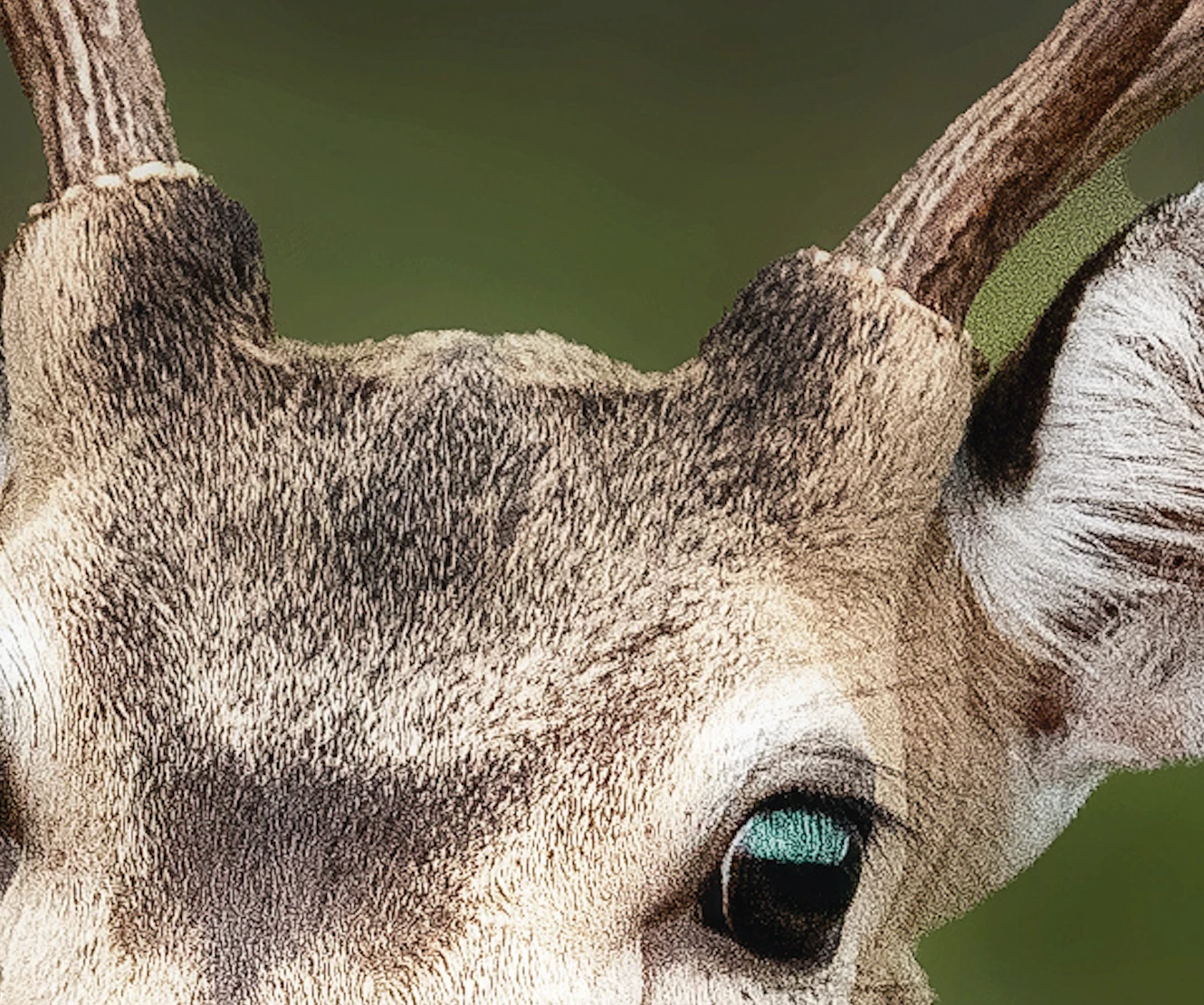
Poor image quality - grainy photo - File # 444844844

  • January 15, 2023
  • 2 replies
  • 374 views

I've just downloaded the below image:


https://stock.adobe.com/au/images/the-sharp-look-of-a-chital-deer/444844844?prev_url=detail 


And the photo is very grainy and completely unusable for printing, even after impoting to Lightroom and editing the photo. I've included a section of the image below, including the area where you can see they tried to fix the gren background but clearly missed an area.


This topic has been closed for replies.
Correct answer Contributor1

Hello, I've verified the issue and granted you a replacement credit. I'll send the asset to the content team for review. Thank you for the report and sorry for the problem with the asset.

2 replies

Contributor1Community ManagerCorrect answer
Community Manager
January 17, 2023

Hello, I've verified the issue and granted you a replacement credit. I'll send the asset to the content team for review. Thank you for the report and sorry for the problem with the asset.

Abambo
Community Expert
Community Expert
January 15, 2023

You are completely right. This image will need to be deleted. Unfortunately, you will need to choose a different asset for this. @Contributor1 will check this and grant a replacement asset.

ABAMBO | Hard- and Software Engineer | Photographer