



Matheus Gazola
Participant
January 17, 2023
Answered

Purchasing video with Credit

  • January 17, 2023
  • 1 reply
  • 214 views

Hello,

Today I was analysing the plans to find a plan that I could buy images and videos altogether. Then I upgrade my simple 10 credits plan ot a 350 credits plan, wich have this amount of content included:
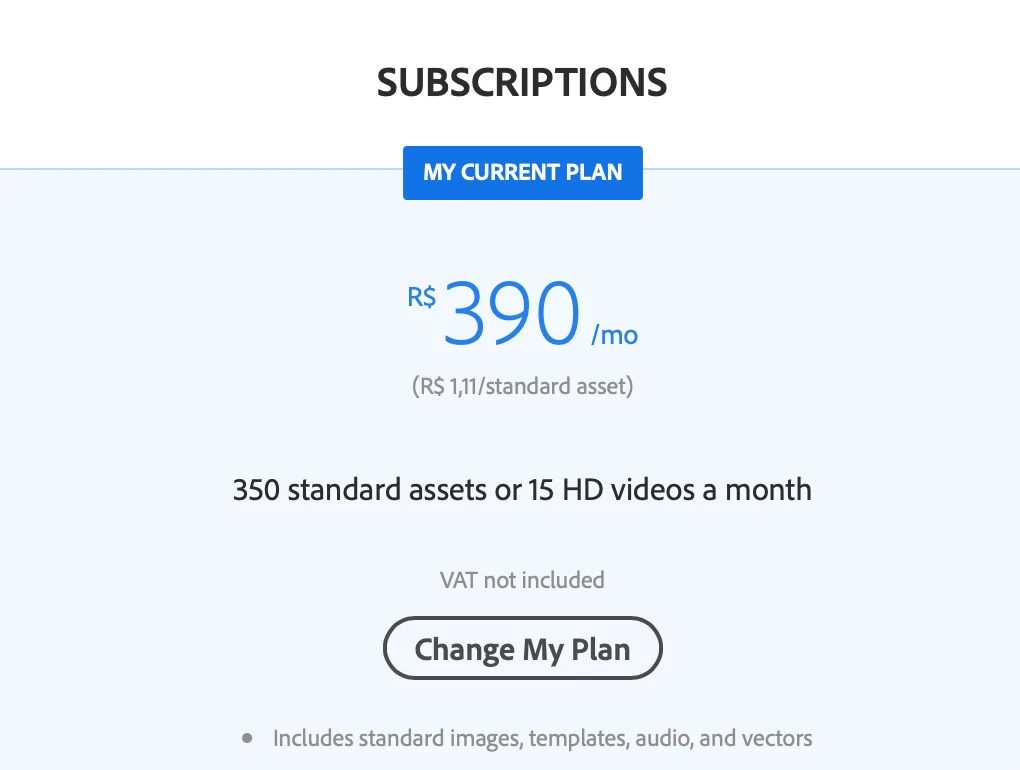
 

350 standard assets or 15 HD videos a month.

After the upgrade, I had a surprise: I couldn't purchase any video with credits. So I start searching in the help center about it. And found many costumers with the same problem.

Everyone with the same answer: "you can't purchase videos with the credits of the plan".

So why Adobe keep the message "X standard imagnes or Y HD videos a month"?

This is missleading the costumer on the upgrade page and on the My Current Plan page.


I feel frustated and disappointed with this.

This topic has been closed for replies.
Correct answer WendellaBee

Please contact customer care, https://helpx.adobe.com/contact.html, for assistance. Click on the chat icon in the lower right portion of the page. If you are unable to see this feature you may need to scroll down before it will appear or set your browser to private or incognito mode. Declining any Adobe Cookies may affect the presence of the chat feature.

1 reply

WendellaBee
Adobe Employee
Adobe Employee
January 17, 2023

Hi @Matheus Gazola,

Using the Adobe ID you are using here on the forum and I see that you are currently receiving promotional pricing for your 350 plan. Subscriptions with promotional pricing do not include video licensing.

Matheus Gazola
Participant
January 18, 2023

Thank you for the answer.
The problem is that when I upgrade; and looking at the image I uploaded, there is NO/ZERO information about promotional pricing and restriction.

So I can't find any way to upgrade my plan to one with videos included.

WendellaBee
Adobe Employee
WendellaBeeCorrect answer
Adobe Employee
January 18, 2023

Please contact customer care, https://helpx.adobe.com/contact.html, for assistance. Click on the chat icon in the lower right portion of the page. If you are unable to see this feature you may need to scroll down before it will appear or set your browser to private or incognito mode. Declining any Adobe Cookies may affect the presence of the chat feature.