graueeule3654
Participant
November 18, 2018
Answered

Re: AI format!

  • November 18, 2018
  • 2 replies
  • 1186 views

I have the same problem. I just wanted to buy a simple image. I don't have Illustrator. How can I get the image AdobeStock_157294684 as a jpg or png?

    This topic has been closed for replies.
    Correct answer twaritar3263062

    Branching to a new discussion,

    Hi Viktor,

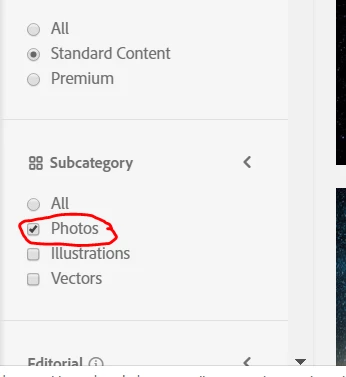
    Thanks for reaching out to the Adobe Stock community. Filter your search on the Adobe Stock website and select "Photos" to get "JPEG" files as shown in the screenshot:
    I would like to inform you that we do not have PNG files in Adobe Stock.

    Also, if you have already downloaded an Ai file from Adobe Stock and you do not have Illustrator, then as a workaround you may download the trial version of Illustrator(7days trial) and can try to use the above-mentioned file.

    You may use this link to download the trial version of Illustrator:

    Download a free trial or buy Adobe products | Adobe free trials & downloads.

    Feel free to update this thread in case of any additional questions.

    Regards,

    Twarita

    2 replies

    Participant
    October 15, 2019

    I have the same issue--I talked to tech support at Adobe and there is no way to search for a JPEG. Adobe should let subscribers know that many of their images are not downloadable without having a paid subscription to their proprietary software. 


    Participating Frequently
    October 15, 2019
    As mentioned above, users can search for "Photos" in image type which mostly are JPEG, you can view panel (where it shows filter). Thank you!
    Participant
    October 16, 2019
    Hi Joon, that isn't true, unfortunately. Photos brings up both the JPEG and vector phones and I cannot download the images I choose that are AI (vector) photos. This needs to be fixed. Adobe Stock search should allow one to search for just JPEGS, and "Photos" does not work for this. It's a very simple search function to be able to filter for just JPEG and to filter out the AI photos, and I'm baffled as to why it doesn't exist.
    twaritar3263062
    twaritar3263062Correct answer
    Participating Frequently
    November 20, 2018

    Branching to a new discussion,

    Hi Viktor,

    Thanks for reaching out to the Adobe Stock community. Filter your search on the Adobe Stock website and select "Photos" to get "JPEG" files as shown in the screenshot:

    I would like to inform you that we do not have PNG files in Adobe Stock.

    Also, if you have already downloaded an Ai file from Adobe Stock and you do not have Illustrator, then as a workaround you may download the trial version of Illustrator(7days trial) and can try to use the above-mentioned file.

    You may use this link to download the trial version of Illustrator:

    Download a free trial or buy Adobe products | Adobe free trials & downloads.

    Feel free to update this thread in case of any additional questions.

    Regards,

    Twarita