
Franck Payen
Inspiring
November 6, 2018
Answered

Stock website : Close preview button too small? Want to click anywhere else!

  • November 6, 2018
  • 1 reply
  • 485 views

Everytime I have to do a search on the website and try to get a bigger preview, I'm stuck with this :
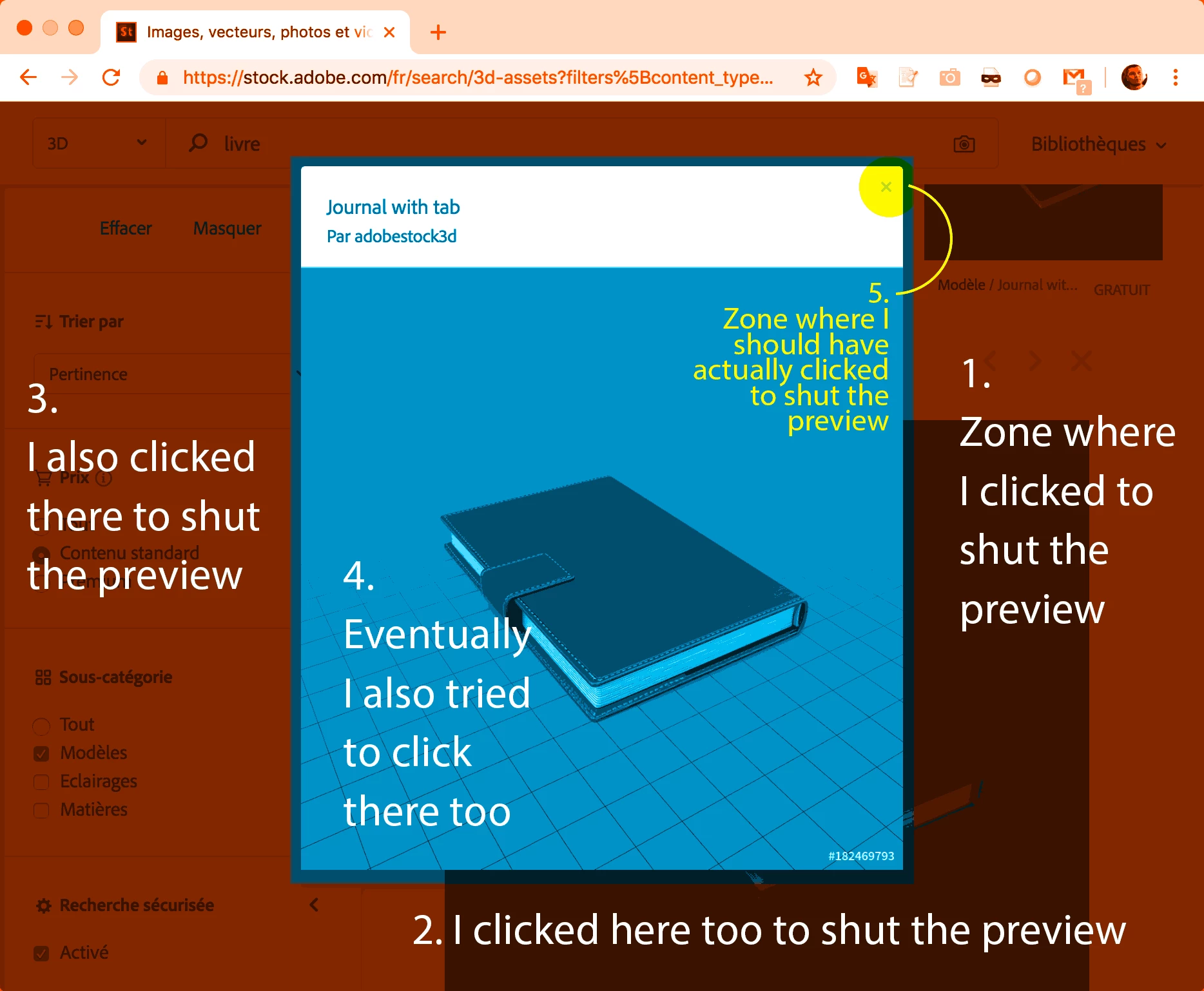
You'd think that I would learn and always look for the very small cross on top right ? Well, usually If I can find what I want inside the CClibs window, I will. So inbetween, i just forget. And EVERYTIME I come back, I click outside of the image to close it. And then on the image. And then on the small cross…

This topic has been closed for replies.
Correct answer joon.Stock

We understand your concern and bring this up to product team for better usability, you can use ESC key to close that as well, but I do agree if you click outside the preview file - it will be nice to close preview as well.

Regards,

1 reply

joon.StockCorrect answer
Participating Frequently
November 6, 2018

We understand your concern and bring this up to product team for better usability, you can use ESC key to close that as well, but I do agree if you click outside the preview file - it will be nice to close preview as well.

Regards,