


Participant
Nov 6, 2018 10:44 PM UTC
Answered

The file I received was not what the MOGRT preview showed

The template I bought was for a 'fairy dust' credits yet the one that shows up Premier Pro is like an atom burst.

This was the preview.

https://v.ftcdn.net/01/76/55/23/700_F_176552318_w9ztsq5YHrZyGUNSr9pQucQFuYNoD760.mp4

This is what I have in my library after downloading the template.
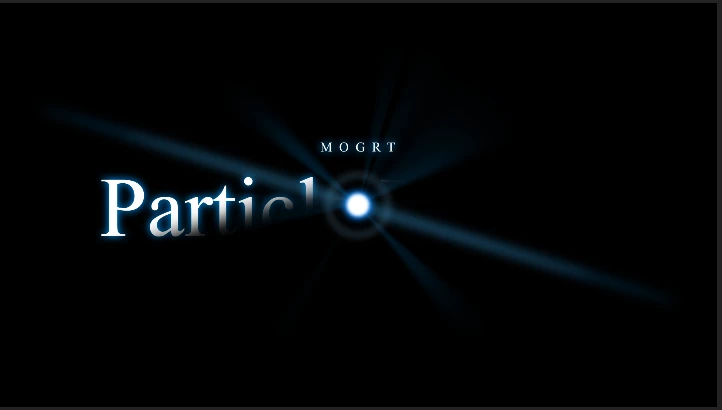
Please either send me the file I bought from the preview or refund me the money paid.

For $20USD I expect what was in the preview.

This topic is closed to new replies. Start a new post to keep the conversation going.
Rameez_Khan
Rameez_KhanCorrect answer
Legend
Nov 13, 2018 11:39 AM UTC

Hi heatherb95838521 ,

Did you sync the font while loading the template for the first time?

In my testing, I found out that the font looks different in Premiere Pro CC 2019 as compared to the preview on Adobe Stock. However, the particle animations (Animation Style 1,2 and 3) are exactly the same. The reason why it defaults to that font is due to a known issue in Premiere Pro CC 2019. I'll share the workaround for that in a later post.

I also tested it with Premiere Pro CC 2018 and it works as expected. The fonts and animations are the same. Do you have Premiere Pro CC 2018 so that you can test it too?

Thanks,

Rameez

4 replies

Rameez_Khan
Legend
Nov 7, 2018 10:03 AM UTC

Hi heatherb95838521 ,

Thanks for posting this in our community. We're here to help.

Sorry to hear that the preview looks different on your computer than what it looks like on Adobe Stock.

Could you provide the File ID of the asset so that we can test it on our end?

Additionally, have you tried changing the properties of the template in the Essential Graphics panel?

Thanks,

Rameez

Translate
Participant
Nov 7, 2018 3:40 PM UTC

The file number is

176552318

I have tried changing it and all the properties are the same just different speeds.

Translate
Rameez_Khan
Rameez_KhanCorrect answer
Legend
Nov 13, 2018 11:39 AM UTC

Hi heatherb95838521 ,

Did you sync the font while loading the template for the first time?

In my testing, I found out that the font looks different in Premiere Pro CC 2019 as compared to the preview on Adobe Stock. However, the particle animations (Animation Style 1,2 and 3) are exactly the same. The reason why it defaults to that font is due to a known issue in Premiere Pro CC 2019. I'll share the workaround for that in a later post.

I also tested it with Premiere Pro CC 2018 and it works as expected. The fonts and animations are the same. Do you have Premiere Pro CC 2018 so that you can test it too?

Thanks,

Rameez

Translate