Participant
February 27, 2023
Answered

Vector assets are all jpegs

  • February 27, 2023
  • 3 replies
  • 284 views

Despite having vector selected within the .ai file is just another jpeg? Why is this happening? Every single file is like this.

This topic has been closed for replies.
Correct answer Abambo

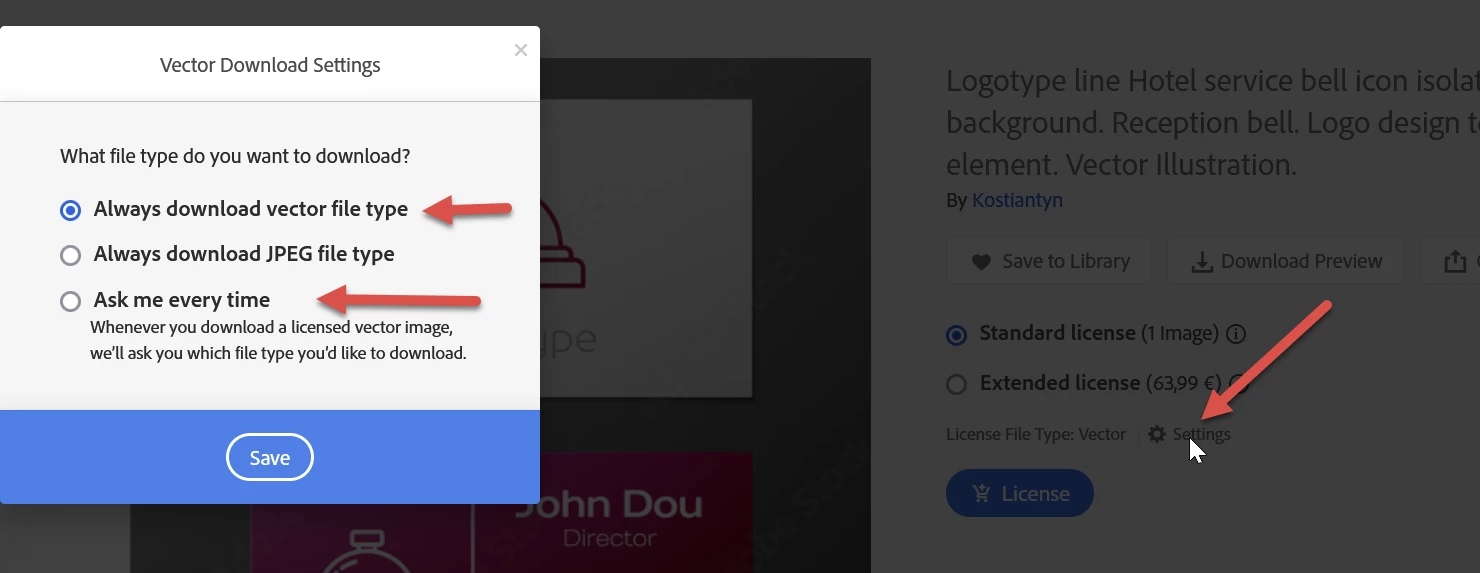
Please post an asset ID of your vector asset that loads as a JPEG.


Be sure that your settings are correct:


3 replies

Abambo
Community Expert
AbamboCommunity ExpertCorrect answer
Community Expert
February 28, 2023

Please post an asset ID of your vector asset that loads as a JPEG.


Be sure that your settings are correct:


ABAMBO | Hard- and Software Engineer | Photographer
Participant
February 28, 2023

First of all, it is clearly visible what type of file, it is specified. Accordingly, if you see there only JPG, then it will not be a vector file.
Secondly, Adobe itself proposes to add tags to the picture in which there is a vector tag, is it the problem of the contributer, and not of Adobe itself?

Legend
February 28, 2023

Please give the stock image numbers for one or more examples of this. Hopefully Adobe will see your reply and review the images.