



adobechr
Known Participant
November 19, 2021
Answered

Vector Clouds with Checkerboard Background

  • November 19, 2021
  • 1 reply
  • 652 views

Hello,

I licensed a transpartent vector file from Adobe Stock, but I can't turn off the background or checkerboard background. Other threads suggest "hiding" the checkerboard and background off in the layer pallete, but it messes up the clouds when hidden.

FILE #:  416835101


Here is the link to the actual AI file with the airplane are in it if you would like to play. 🙂

https://www.dropbox.com/s/enq90pkqjdvfnx7/ModestoMocha.ai?dl=0


Help? I see these vector effects all over Stock Adobe, but many of them are really hard to understand. Please advise?


This topic has been closed for replies.
Correct answer Contributor1

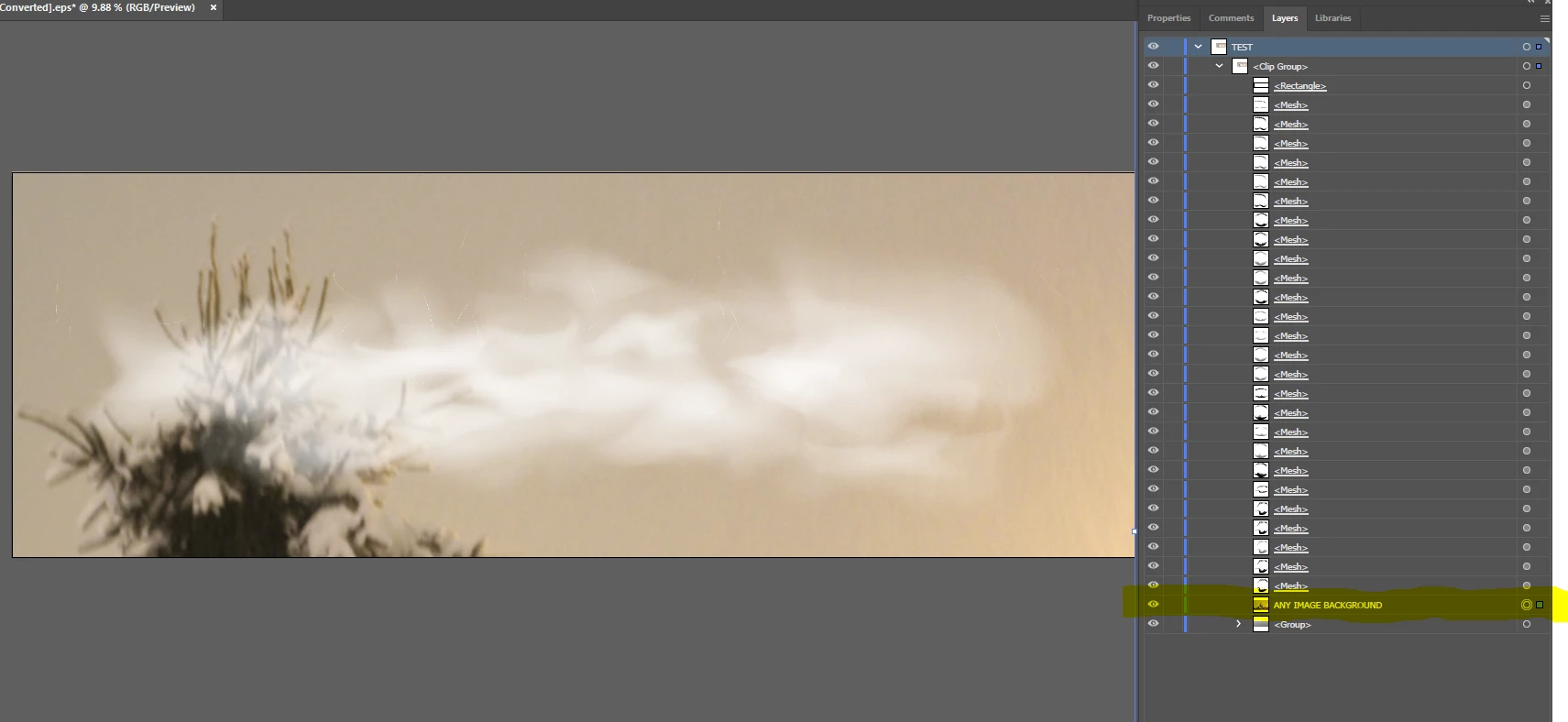
Hello, it looks like you can add any layer above the base <Group> as seen in the screenshot below and it will cover the checkerboard:

1 reply

Contributor1Community ManagerCorrect answer
Community Manager
November 19, 2021

Hello, it looks like you can add any layer above the base <Group> as seen in the screenshot below and it will cover the checkerboard:

adobechr
adobechrAuthor
Known Participant
November 20, 2021

I was too busy trying to delete out the checkerboard and background like most of these type files. I didn't think to just put a white rectangle behind my plane, but ON TOP of the checkerboard BG in the layers. It worked.