


Inspiring
July 29, 2025
Answered

All Design Assets in Adobe Express have Exclamation Marks in Red Triangles

  • July 29, 2025
  • 14 replies
  • 673 views

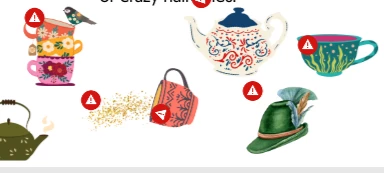
Hello, I am having a problem with using the design assets in Adobe Express. Everytime I place down an image it eventually has an exclamation mark in a red triangle hovering above it. I've tried increasing the scale, decreasing the scale, deleting and readding. Nothing seems to work and there is no additional information provided in the application. Any help would be greatly appreciated. 


I do have a premium account and this problem happens with the free assets as well. When I try to download the file to print it says "We're working on your file. It'll be ready to download soon". It has said this for over a week now.                                       
Correct answer lauren_9184

I am on a work network and our IT preson had to go in and mess with a bunch of settings until it worked. Unfortunately I don't know what he had to change in order to get it to work. 

14 replies

lauren_9184AuthorCorrect answer
Inspiring
September 4, 2025

I am on a work network and our IT preson had to go in and mess with a bunch of settings until it worked. Unfortunately I don't know what he had to change in order to get it to work. 

jane-e
Community Expert
Community Expert
September 4, 2025

@lauren_9184 

quote

I am on a work network and our IT preson had to go in and mess with a bunch of settings until it worked. 

By @lauren_9184


I've moved your post from Bugs to Discussions since this was not a bug in Adobe Express. Thank you for sharing your solution.


Jane

Participant
September 4, 2025

How were you able to resolve the issue?


Inspiring
September 4, 2025

For me, it did end up being a network issue.

Participant
September 4, 2025

This is with all assets. 

Participant
September 4, 2025

I am having the same issues. I just started a few weeks ago. I hope to find a resolution soon.

Tarun Saini
Community Manager
Community Manager
September 4, 2025

Hi @Melissa360073801o5t,


We're sorry to hear about this. Could you please let us know if this is happening with all assets or specific assets? Typically, this means that the licensing for some of the assets used in the file has changed and needs to be removed and updated.


Please open the layers for the file, check for any blank layers (including audio tracks if this is a video project), and delete them. After deleting the blank layers you should no longer receive this error.


Regards,

Tarun

Adobe Employee
August 5, 2025

@lauren_9184 this is the troubleshooting guide for general network issues (not specifically Stock assets), but may still be useful: https://helpx.adobe.com/express/web/troubleshoot/file-conversion-issues/unable-to-access-adobe-express.html


Do you have another network (personal, for example) to give this a try on — if only to check what might be at play?


Thanks,

Abhi G 

Inspiring
August 5, 2025

@Tarun Saini are there specific browser or network settings that would cause this problem? I've been assured no changes have been made to the network or my browsers (I am on a work computer and network), but perhaps if I knew what to look for I could ask about specific things. 

Inspiring
August 5, 2025

@Tarun Saini I have already tried all of those steps with no change

Inspiring
August 5, 2025

@Abhi.G @ ADBE wondering if there are any updates on this issue? It is interfering with my ability to do my job and no matter what I do, every single asset has that warning symbol in the corner (execept the text and the occasional animated sticker). 

Tarun Saini
Community Manager
Community Manager
August 5, 2025

Thanks for trying the steps @lauren_9184,


Did you try using the other suggested browsers (Safari, Microsoft Edge, and Google Chrome) or incognito mode to see if it makes a difference? 


Also, try clearing the browser's cache and cookies, and restarting the browser and try again. For more information on how to clear cache and cookies check this link- https://adobe.ly/4a5ipUF and how to use incognito mode- https://adobe.ly/4a2UzZV 


Let us know how it goes.


Regards,

Tarun

Inspiring
July 30, 2025

@Abhi.G @ ADBE Nothing has changed with either our network or my browser.