



3 If conditions in formula, excel to e-sign form, "not enough arguments" syntax error
Hello - I am really hoping someone can help me with this. I have converted an excel form to an Adobe E-sign form using Adobe Pro. I decided to switch directions and start using the frequently used template tool in the Adobe E-sign document cloud. I am trying to translate the following calculation formula from Excel format to the Adobe DC E-sign format in the calculations/formula field window, screen shot included below. I am getting a "not enough arguments syntax error from the E-sign DC formula window. Any thoughts as to why this formula is not working, it works as expected in excel.
Excel Formula (this formula works in excel):
=IF(P37=0,P38-P39,IF(P37<P38,P38-MAX(P37,P39),IF(P37=P38,0)))
My excel field cell to Adobe field names translation:
TotalsHistoricPrice = P37
TotalsFirstorAverage = P38
TotalsFinalPrice = P39
My Adobe Forumula:
IF(TotalsHistoricPrice=0,TotalsFirstorAverage-TotalsFinalPrice,IF(TotalsHistoricPrice<TotalsFirstorAverage,TotalsFirstorAverage-MAX(TotalsHistoricPrice,TotalsFinalPrice),IF(TotalsHistoricPrice=TotalsFirstorAverage,0)))
When I put this into the adobe e-sign formula window I get the following. I have been playing around with this for hours now and cannot figure out the error/issue.
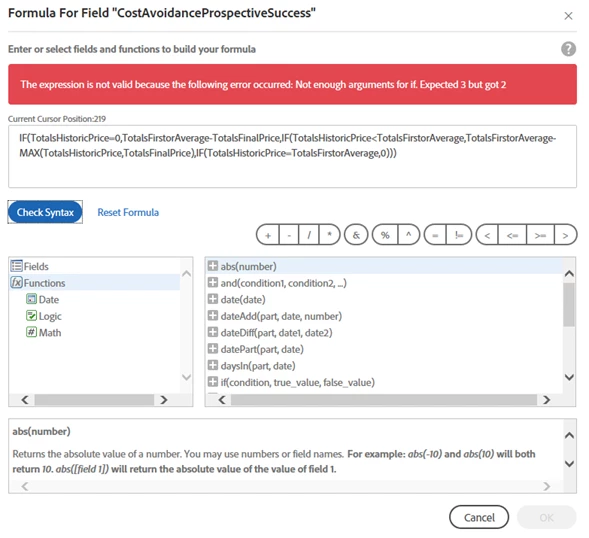
Please let me know if you have any thoughts as to why this isn't working.
Thanks so much for having a look/reading my post.
 AdChoices