
Adding a formula to an outdated form?
I'm in the process of digitizing a self-evaluation form that my students fill out each year during their undergraduate program. The form asks them to enter a number between 0 and 3 in several categories, and their total score is then associated with a rank (emerging, proficient, etc.). Since I am going through the process to make it a fillable PDF instead of a pen-and-paper form as it has been in past years, I'm wondering if a formula can be added so the numeric sum are automatically calculated (per year) as the students fill in the form (see a screenshot of the original form):
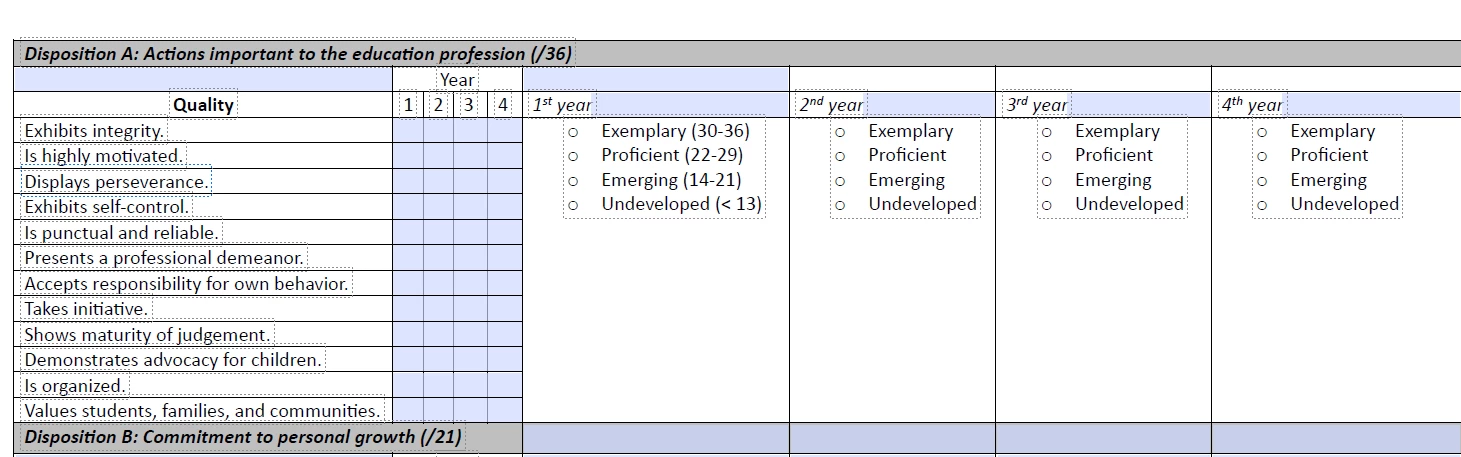
Since this form is ultimately aligned with state licensure standards I can't make significant changes, but I am allowed to add some automation if I can figure out how. I did some exploring through tutorials but couldn't find anything that showed an elegant way to do this, although my search did indicate it is possible. Any Acrobat experts have an idea of how to implement this?


 AdChoices