



Answered
Adobe Acrobat XI Pro - Save Settings: Automatically save...
One of our users had an unexpected shutdown on their Surface Pro 4 | Windows 10 while working on a PDF file. The user turned back on the machine, but Acrobat did not prompt to auto-recover the file so the user lost hours of work (I know it is the user's error for not periodically, manually saving his/her work). Check Acrobat's Preferences --> Save Settings and "automatically save documents..." option is enabled.
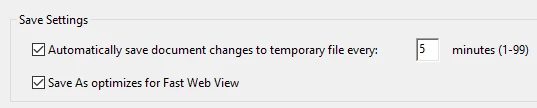
From other Adobe forums, I checked the location the autosave temp file may most likely be saved at. But cannot find any autosave copy of the file.
C:\Users\<USERNAME>\AppData\Roaming\Adobe\Acrobat\11.0
Does anyone know where else to look for the autosave temp file? For now the user decided to redo the work.

 AdChoices