Participant
May 3, 2019
Answered

adobe esign

  • May 3, 2019
  • 1 reply
  • 1077 views

I was able to login using my credentials for Adobe eDocs but when I got to "for signature" and select "adobe sign manage" it takes forever to load. I'm trying to find a document I sent out for signature if it has been signed or not.

This topic has been closed for replies.
Correct answer Meenakshi_Negi

Hi Davidh,

Sorry for the delay in response.

As you need to check if the document sent for signature is signed or not, please refer to the steps provided below:

- Go to "For signature".

- Click on the filter icon provided at the right-hand side of the screen.

- Then check the box either for Completed (for signed forms) or Waiting for others ( for sent for signature).
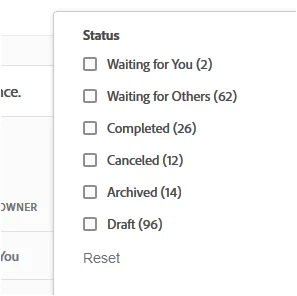
Check if that helps.

As it taking long to load the Adobe Sign Manage page, please try to clear the cache and cookies for the browser.

Try once to open the Adobe Sign in the new incognito window in Chrome or try an alternate browser.

Let us know if you need any help.

Regards,

Meenakshi

1 reply

Meenakshi_Negi
Meenakshi_NegiCorrect answer
Legend
May 22, 2019

Hi Davidh,

Sorry for the delay in response.

As you need to check if the document sent for signature is signed or not, please refer to the steps provided below:

- Go to "For signature".

- Click on the filter icon provided at the right-hand side of the screen.

- Then check the box either for Completed (for signed forms) or Waiting for others ( for sent for signature).

Check if that helps.

As it taking long to load the Adobe Sign Manage page, please try to clear the cache and cookies for the browser.

Try once to open the Adobe Sign in the new incognito window in Chrome or try an alternate browser.

Let us know if you need any help.

Regards,

Meenakshi


