
Inspiring
April 22, 2025
Question

Adobe sign 내 디지털 ID 인증서 유효성 검사 관련 질문입니다.

  • April 22, 2025
  • 2 replies
  • 198 views

Adobe sign 내 디지털 ID 서명을 하기 위해 인증서를 발급하여 공용 드라이브에 저장하였습니다.  


고용 드라이브에 저장된 디지털 ID인증서를 통해 각 담당자들이 디지털 서명을 완료한 이후에


서명이 완료된 문서를 열면 [서명이 유효한지 알 수 없다]는 다음과 같은 안내 메세지가 나옵니다. 
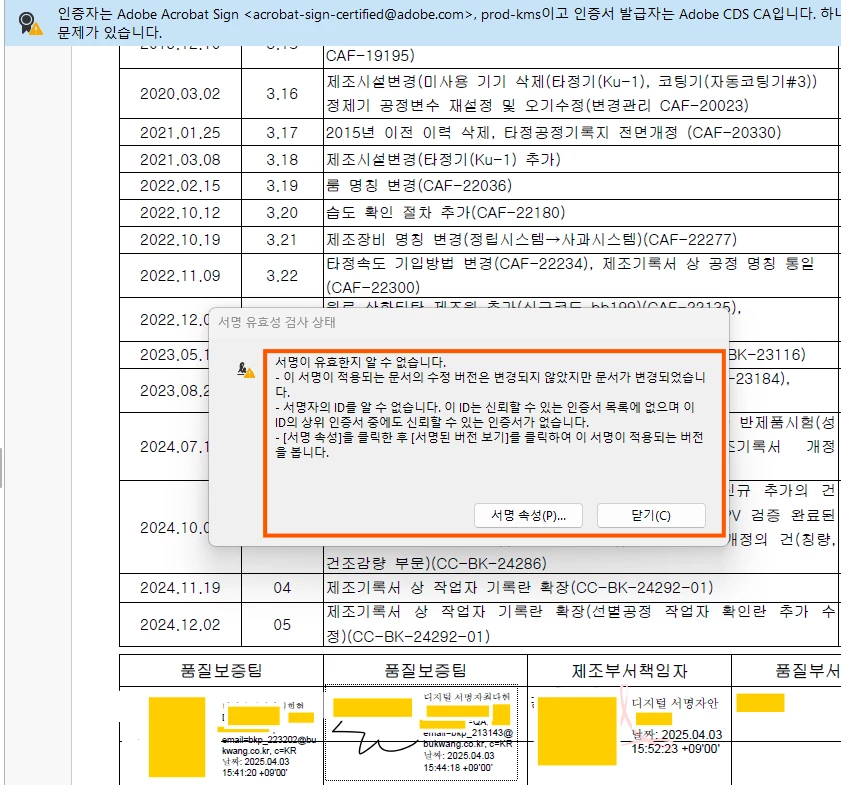
제가 서명한 디지털 서명은 [서명이 유효함]이 확인이 되는데 제가 아닌 다른 두분이 서명한 디지털 서명은 [서명이 유효하지 않음] 이라는 메세지가 뜹니다. 


어떻게 조치를 할 수 잇는건가요??

또한, 디지털 ID의 인증서의 유효기한은 5년으로 설정되는것으로 알고 있는데 
만료되고 나면, 이전에 서명한 문서들은 유효성이 어떻게 되는건가요??


추가적으로 인증서를 저장해두었던, 저장 경로나 인증서 파일의 저장 이름을 변동하는 경우에도

인증서의 유효성이 사라지는 것인가요???


확인 부탁드립니다. 

2 replies

MikelKlink
Participating Frequently
April 22, 2025

If I understand your posting as translated by the Microsoft Translator correctly, you are not using "Adobe Acrobat Sign" (which is an Adobe web service for signing PDFs) but instead are using the Adobe Acrobat desktop program to apply digital signatures. The forum area in which you posted your question - Adobe Acrobat Sign discussions - focuses on questions regarding the Adobe Acrobat Sign web service, so your post should be moved to a different area, maybe the Adobe Acrobat discussions.


Concerning the actual issue:
You say you yourself have created a certificate for digital signing. I assume you have created a so-called "self-signed" certificate in Adobe Acrobat and stored it - together with the associated private key - in a pfx file.

For your local Adobe Acrobat installation it is natural to trust this certificate. After all, you have created it there to sign with it. But what reason do other Adobe Acrobat installations (or other validators) to trust that certificate? None! Thus, you have to configure every Adobe Acrobat installation involved in your use case and explicitly add your certificate (and all the other certificates you mention) to the trusted certificates to enable validation. (Beware, share only the certificates themselves, not the associated private keys, for this.)

This of course is very time-consuming and error-prone. So you should actually switch from your self-signed certificates to certificates signed by a common issuer. Then you'd only need to add the certificate of that common issuer to the trusted certificates of every Acrobat installation involved. And if this issuer already is a certificate authority liosted on the Adobe Approved Trust List (AATL) or on the European Trust Lists (EUTL), you don't even need to do that as Acrobat trusts all those issuers by default.


Meenakshi_Negi
Legend
April 22, 2025

Hi Exquisite_Panther2322,


Thank you for reaching out.


Please confirm if you are adding a signature using Acrobat Sign and then opening the document in Acrobat. If the document was signed using Acrobat Sign, it can be verified using the transaction ID even after the certificate has expired. You will need a valid certificate at the time of signature. 

However, we will check with the team for further information and update you. 


Thanks,

Meenakshi