
Participant
August 18, 2025
Answered

Adobe Sign automatic field deection
  • August 18, 2025
  • 1 reply
  • 236 views

Hi All,


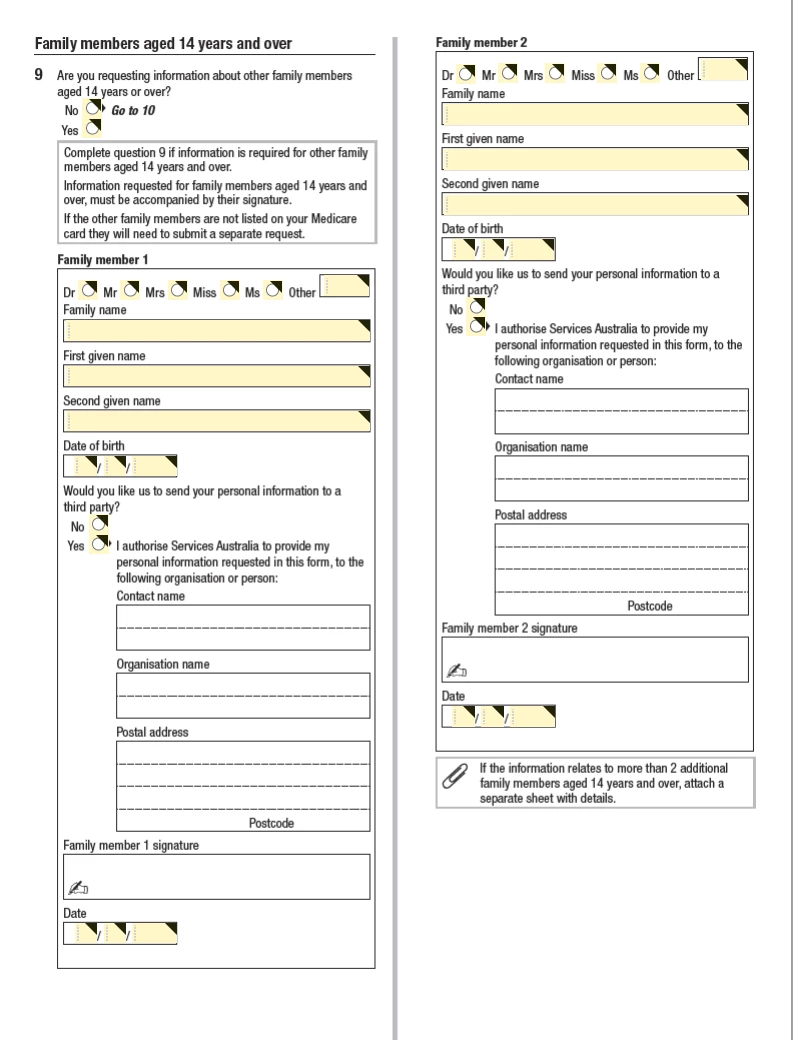
With respect to the above image, is there any way to stop Adobe Sign from automatically placing those yellow text boxes.  The yelllow boxes are editable/fillable fields that are preset in the Adobe form.  


I did not create this document.  


Any assistance will be greatly appreciated.  


Thank you!

Correct answer Meenakshi Negi

Hi Glendon2699191455xe,


Thank you for reaching out.


Adding to the information shared by the creative explorer.


When you upload a form, Acrobat Sign automatically scans the document for visual cues that suggest where form fields may be needed. In the screenshot above, form fields were already added prior to uploading, so it shows only those fields in the form. As you have not created the form, you can only try to remove those fields if you do not require them.

For more information on automatic field detection in Acrobat Sign, refer to the following help document: Automatic field detection.


Thanks,

Meenakshi


1 reply

creative explorer
Community Expert
Community Expert
August 18, 2025

@Glendon2699191455xe short answer is no (unless you created the form, but you didn't). The yellow boxes are a built-in feature of Adobe Acrobat Sign's form field recognition. They are designed to help users identify fillable areas and cannot be turned off globally.

m
Meenakshi Negi
Community Manager
Meenakshi NegiCommunity ManagerCorrect answer
Community Manager
August 26, 2025

Hi Glendon2699191455xe,


Thank you for reaching out.


Adding to the information shared by the creative explorer.


When you upload a form, Acrobat Sign automatically scans the document for visual cues that suggest where form fields may be needed. In the screenshot above, form fields were already added prior to uploading, so it shows only those fields in the form. As you have not created the form, you can only try to remove those fields if you do not require them.

For more information on automatic field detection in Acrobat Sign, refer to the following help document: Automatic field detection.


Thanks,

Meenakshi