
Participant
November 19, 2019
Question

Adobe Sign - Complete in Any Order option not available

  • November 19, 2019
  • 1 reply
  • 1416 views

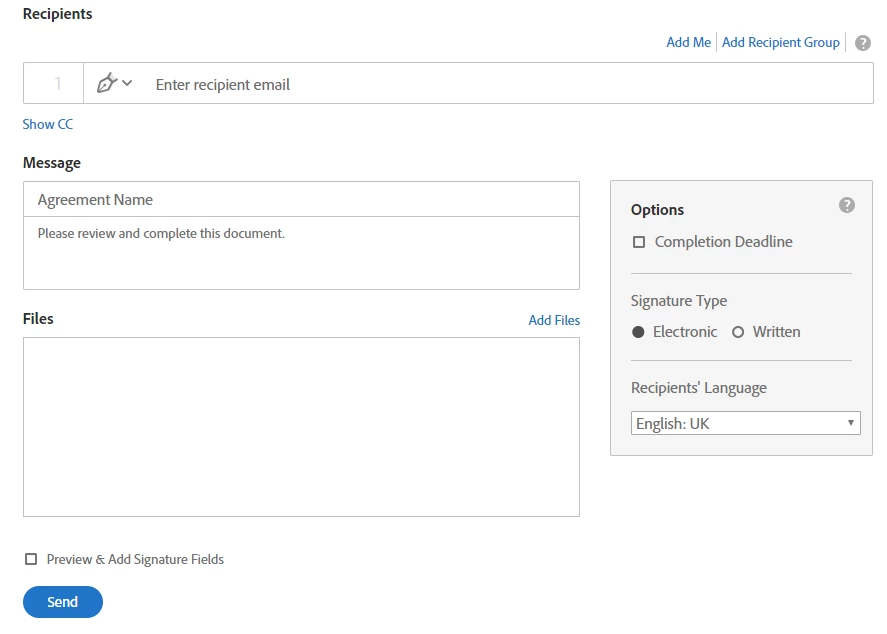
Hi, I'm having an issue with Adobe Sign. We're trying to enable documents with multiple signatories to be signed in any order, rather than in email address order. All user guides list a 'Complete in Any Order' switch that can be used at the web form set up stage. However, this option is not available on our Adobe Sign. I was just wondering if there was a reason for this?
This topic has been closed for replies.

1 reply

Meenakshi_Negi
Legend
November 19, 2019

Hi Matt,


As the radio button for Complete in order/ Complete in any order does not appear on the Send page, try to open the Adobe Sign on an alternate browser or use the Chrome new incognito window. Check if the option appears.

The option does appear on our end when sending document for signature.

Could you please confirm the Adobe Sign service level you are using?


Let us know if you need any help.


Regards,

Meenakshi

Participant
February 4, 2021

I'm trying to assist one of our team members who is also experiencing the same issue of not seeing the button regarding signature order. We used Chrome, a Chrome incognito window, and IE with the same issue. The only difference was when she received her license, she chose to archive her existing account (free) since it was associated with her email address. Any suggestions on how to resolve this? She has an Adobe for Teams account.