Participant
February 20, 2020
Answered

Adobe Sign Date Format changes

  • February 20, 2020
  • 3 replies
  • 17585 views

Hello All,


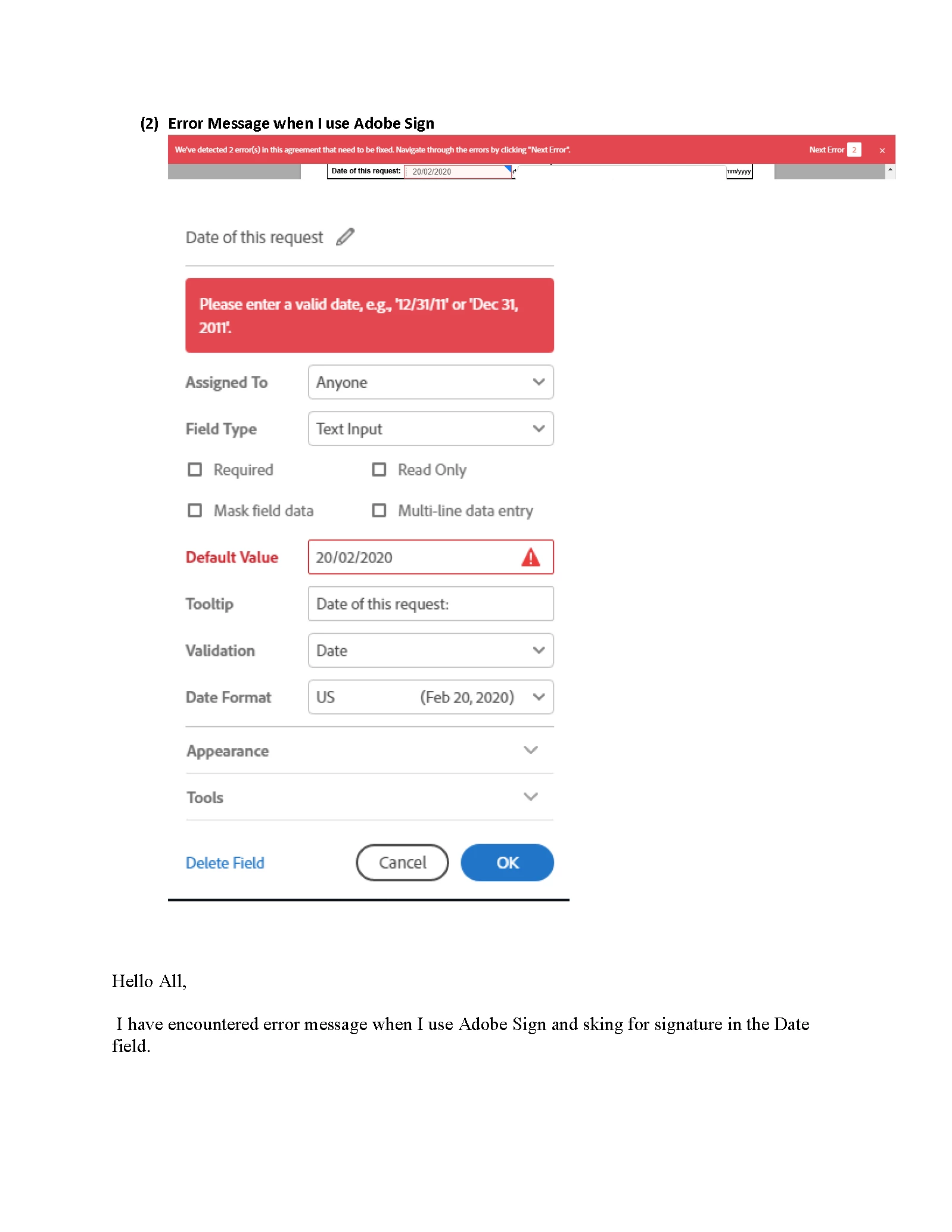
I have encountered error message when I use Adobe Sign and sking for signature in the Date field. 


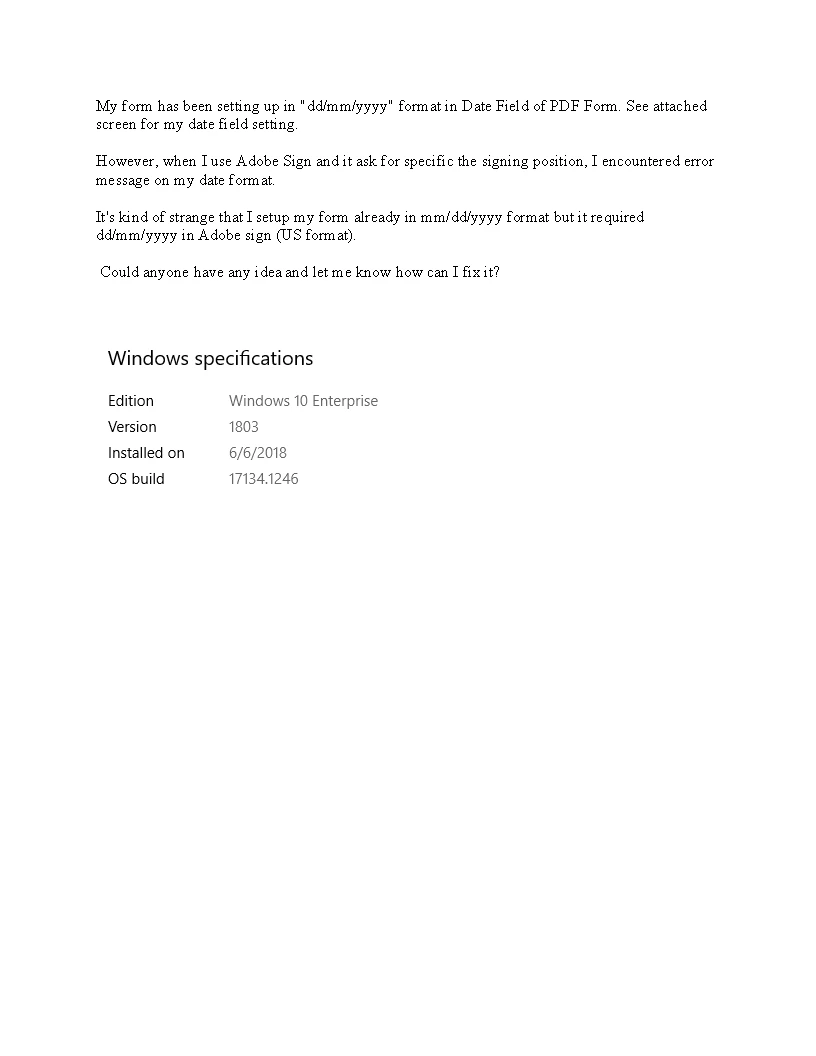
My form has been setting up in "dd/mm/yyyy" format in Date Field of PDF Form. See attached screen for my date field setting. 


However, when I use Adobe Sign and it ask for specific the signing position, I encountered error message on my date format. See attached screen captured as well. 


It's kind of strange that I setup my form already in mm/dd/yyyy format but it required dd/mm/yyyy in Adobe sign (US format). 


Could anyone have idea and let me know how can I fix it?


Thank you for your support in advanced!


With warmest regards,

Kalex


PS, I'm using Windows 10. Adobe Acrobat Standard DC version 2020.006.20034.


This topic has been closed for replies.
Correct answer ls_rbls

Hi,


I try to recreate your issue on my end but I dind't get that error.


However, looking at your screenshot, it seems like it is related to a date validation mechanism that needs to be customized when you're using Adobe Sign to add data and signature blocks to the document before it is sent for signatures.


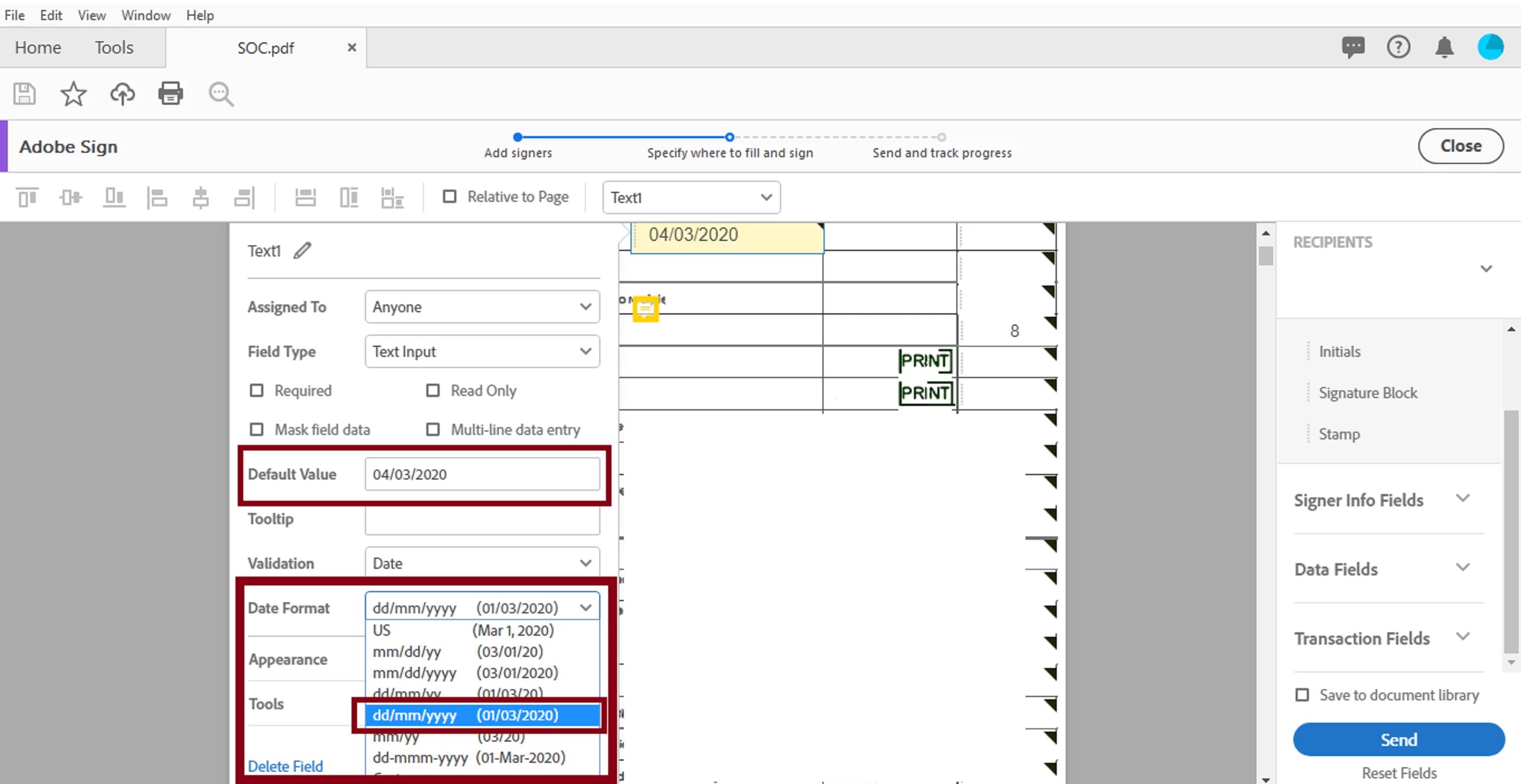
What I did on my end, I just selected the desired  date format to the date field. See slide below:


3 replies

Participant
November 23, 2020

Hi,


I have the same problem. The date format using Adobe Form doesnt get carried forward to Adobe Sign. With the volume I am working with, it is just not possible to manually change dates in the form as you have shown. I tried using the script "Text1_es_:signr1:isdate(format=dd/mm/yyyy)" in Prepare form under Custom Calculation Field and it doesnt work. I tried locking the format and it doesnt work. This is causing so much problem and we are considering to stop using this tool altogether. Is there another way to fix this or am I making an error in the script above?


Thank you.


BR,

Megs.

Participant
August 13, 2020

I use text tags in a Word file and want to insert the automatic signature date field {{Dte_es_:signer1:date}}. However, Adobe Sign converts this to the format "Aug 13, 2020". Is there a way to change the format to dd mmm yyyy? I have tried {{Dte_es_:signer2:date(format=”dd mmm yyyy”)}} but this does not work.

Adobe Employee
August 25, 2020

Check this out: https://community.adobe.com/t5/adobe-sign/date-field-format/td-p/10755635?page=1

I think that must be xx:isdate(format="dd mmm yyyy")

Tag reference is here: https://helpx.adobe.com/de/sign/using/text-tag.html

Look at Date

Participant
August 25, 2020

Thanks, krokopi. But 'isdate' does not seem to work with date stamps, only with fields that are to be completed by the user. Using 'isdate' here stops the tag being recognised at all unfortunately. 

ls_rbls
Community Expert
ls_rblsCommunity ExpertCorrect answer
Community Expert
March 1, 2020

Hi,


I try to recreate your issue on my end but I dind't get that error.


However, looking at your screenshot, it seems like it is related to a date validation mechanism that needs to be customized when you're using Adobe Sign to add data and signature blocks to the document before it is sent for signatures.


What I did on my end, I just selected the desired  date format to the date field. See slide below:


Kalex NgAuthor
Participant
March 2, 2020

Hi,


Thanks for the reply. From your screen capture, I think you have enountered error message then you chose the correct date format and then move forward. It seems to be a workaround cos it heppens everytime.  


My problem was solved and I'd changed the field tag to "Text1_es_:signr1:isdate(format=dd/mm/yyyy)" using "Prepare Form". Afterwards, no more error message appeared when I use "Fill & sign".


Anyway, thank you very much for your concern and comment. 


Cheers, Kalex 

ls_rbls
Community Expert
Community Expert
March 2, 2020

you're welcome,  don't forget to mark your answer as correct