
Participant
November 15, 2022
Question

Adobe Sign - Issue with Date Format

  • November 15, 2022
  • 2 replies
  • 2562 views

Kia ora.


I am unable to change the Adobe Sign document date stamp format and Final Audit Report History to NZT and DD/MM/YYYY.


Seems Adobe does not like New Zealand and prefers all date formats to default to GMT or US or MM/DD/YYYY.


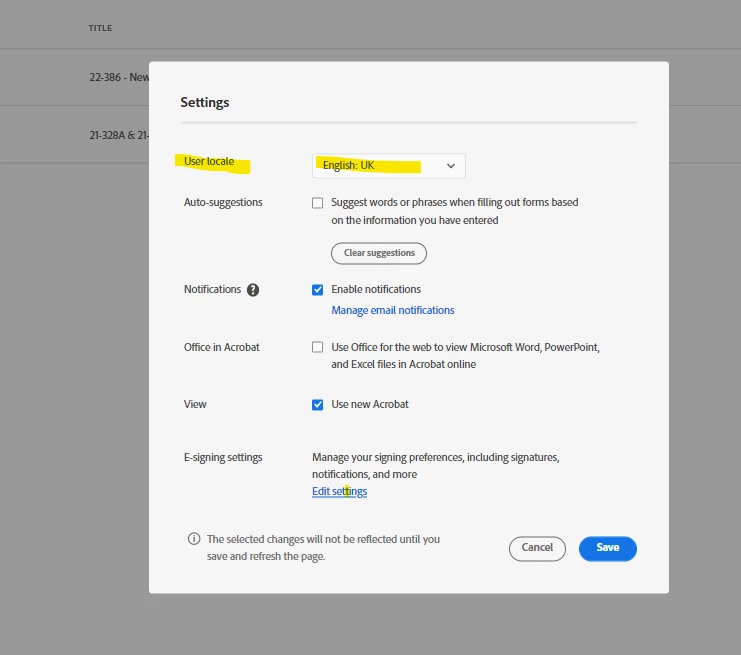
Had a look at https://helpx.adobe.com/nz/sign/using/sign-config-defaul-time-zone.html but not very helpful. I went to Account Settings but no visibility of or ability to change "Global Settings". See image.


It seems a simple standard requirement to allow an end user to change a date format to suit the country you are in was missed by Adobe Developers! 


Any ideas?


2 replies

Participant
December 5, 2022

Thanks Meenakshi.


In Settings / E-signing settings / My Profile my settings are already set at 
Time Zone: (GMT+12:00) New Zealand


Under My Plan the plan that I am on under our company is confirmed on Adobe for Enterprise.  I am not on Acrobat Sign Individual plan.


Our IT Admin team are also unable to fix/change this at Enterprise level. In the Enterprise Admin portal but there is no option to enable this for the company.


Unfortunately still an issue.


Any other ideas?


Meenakshi Negi
Community Manager
Community Manager
November 29, 2022

Hi Samuel22795698c9jk,


Thank you for reaching out, and sorry about the delay in response.


The information in the above link is for the Acrobat Sign Enterprise account.

It seems that you are using the Acrobat Sign Individual plan. That is the reason you get this settings page.

The option to change the settings is not available with your current plan.


If you wish to get the account settings page, click on the Edit Settings hyperlink for E-signing Settings in the screenshot shared above.


Hope the information helps.


Thanks,

Meenakshi