Participant
February 15, 2018
Answered

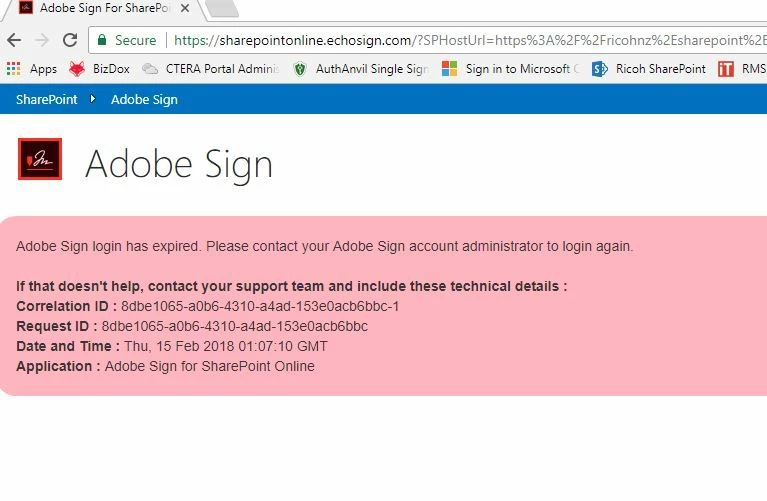
Adobe Sign Login has expired

  • February 15, 2018
  • 1 reply
  • 1533 views

Hav been getting the following when trying to log on

And when logging in to check

This topic has been closed for replies.
Correct answer Meenakshi Negi

Hi Ricohitsc,

Sorry for the delay in response.

We have checked your account and it seems to be working fine.

If you still experience any issue with your Adobe Sign account for Sharepoint, I would recommend you to contact support directly to get this checked.


# For the subscribed account, use the steps mentioned below to contact support:

  • Login to your Adobe Sign account directly via https://secure.echosign.com/public/login
  • Once logged in, check the upper right corner of the page and click the question mark icon.
  • It will re-direct you to the page where you get the option to create the support case or to start a chat with the team.
  • If you've never logged in this way, use the forgot password option on the login link to set your password.

Let us know if you need any help.

Regards,

Meenakshi

1 reply

Meenakshi Negi
Meenakshi NegiCorrect answer
Legend
May 15, 2018

Hi Ricohitsc,

Sorry for the delay in response.

We have checked your account and it seems to be working fine.

If you still experience any issue with your Adobe Sign account for Sharepoint, I would recommend you to contact support directly to get this checked.


# For the subscribed account, use the steps mentioned below to contact support:

  • Login to your Adobe Sign account directly via https://secure.echosign.com/public/login
  • Once logged in, check the upper right corner of the page and click the question mark icon.
  • It will re-direct you to the page where you get the option to create the support case or to start a chat with the team.
  • If you've never logged in this way, use the forgot password option on the login link to set your password.

Let us know if you need any help.

Regards,

Meenakshi