
Answered
Adobe Sign - oAuth error during setup with Sharepoint Online
Greetings All,
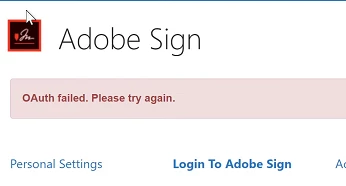
I am trying to setup Adobe Sign for SharePoint Online using Adobe's install directions listed here. I get all the way to "Establish a trusted relationship to Adobe Sign" in the guide. When I attempt to sign on to Adobe using an admin account, I get an oauth failed error as seen below. I cant proceed with the setup until I can logon.
I am currently licensed with "Adobe Creative cloud for teams". I am unsure if this license has the permissions to configure Adobe Sign for SharePoint Online.
Anyone?


 AdChoices