
Participant
September 11, 2024
Question

Adobe Sign - Salesforce Opportunity object in Agreement Template no visible

  • September 11, 2024
  • 2 replies
  • 572 views

hello everyone,

i just got this problem in last days and not able to find out the root cause.

Basically not able to select Opportunity object from  Salesforce object list (neither in the "Choose from other objects"). I can see all objects expect Opportunity.
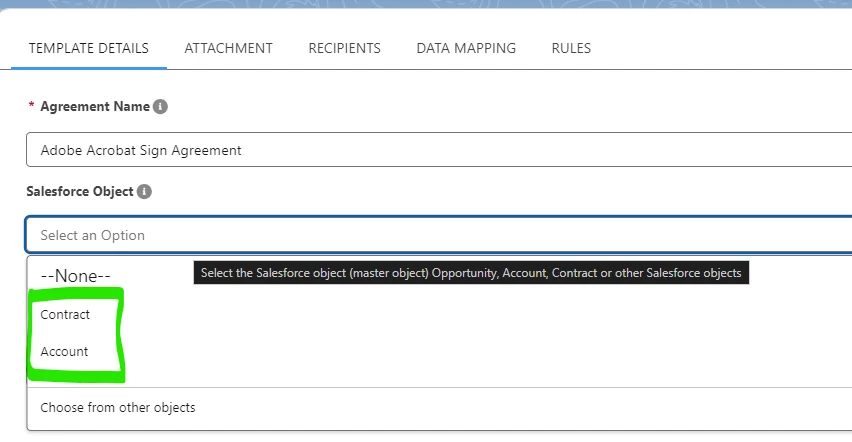
Is there any suggestions to double check in the system?

I'm able to create Opportunity records and manage them.

Regards

Thanks

Davide


This topic has been closed for replies.

2 replies

Participant
December 5, 2024

I am having the same issue....have not been able to resolve

Meenakshi Negi
Community Manager
Community Manager
September 12, 2024

Hi davide_8484,


Thank you for reaching out.


We have checked that you are using the Acrobat Sign Developer service, so we are moving this thread to the Acrobat Sign Developer board for visibility.

As you have a question related to API integration, the experts can best answer it. With the developer account, you may also contact the pre-sales team. They will be able to provide you the pre-sales technical assistance and share the correct information.
Please refer to the following link to contact them: https://adobe.ly/47ntjDW. You may use the Contact Us button for Adobe Sign Solutions under the team tab.


If you have an Acrobat Sign Enterprise account with an alternate email address and have an integration-related question, the experts can best answer it. Please contact our Adobe Sign Enterprise support team for the correct information. You may contact them using the steps in the following help document: https://adobe.ly/3B2gwuJ.


You may refer to the following help document in the meantime: https://adobe.ly/47EYWcx. Check if that helps.


Thanks,

Meenakshi