Participant
December 13, 2018
Answered

AdobeSign Widget Conditional Logic Question

  • December 13, 2018
  • 1 reply
  • 1352 views

Hi, all

I have been using the AdobeSign product for quite some time, but couldn't find any support documentation for the following use case for conditional formatting. I'm looking to enable/disable a field when there is ANY text in another field.

For example, enabling field B upon anything filled into field A. Is there a way to implement this, short of creating a long string of "any" conditions, i.e., show/enable field B when field A satisfies ANY of the following conditions:

Contains: the letter "a"

Contains: the letter "b"

Contains the letter "c", etc.

Any help/advice would be appreciated, thanks!!

This topic has been closed for replies.
Correct answer scocarte

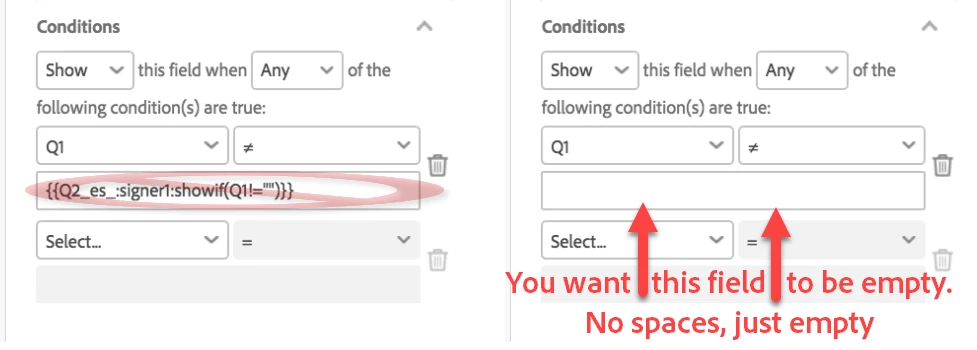
When you are using the drag and drop interface, you need to leave the field empty.

(The text tag is only used if you are building forms in a text environment.  That's confusing in my explanation... sorry about that!)

1 reply

Participating Frequently
December 13, 2018

Hi!

If you want to show FieldB only when there is content in FieldA, the condition (for FieldB) is to Show when the trigger field is not empty (null)

The text tag version of that would be something like: {{FieldB_es_:signer1:showif(FieldA!="")}}

Hope this helps!

Participant
December 13, 2018

Hi Scott!

Thank you so much for the quick response. I think we are very close, and most definitely my fault!! I took a screenshot following your implementation and when I viewed the widget the fields were still not hidden.

As previously described, I'm would like to show Q2 only when Q1 contains text. Is it perhaps something that has to do with the syntax of "signer1"? Are all widget signers automatically assigned as signer1? I'm setting this up as a widget link (i.e., anyone with link can sign).

THANK YOU for your help. Sorry for the follow up!!

Cheers!

scocarte
scocarteCorrect answer
Participant
December 13, 2018

When you are using the drag and drop interface, you need to leave the field empty.

(The text tag is only used if you are building forms in a text environment.  That's confusing in my explanation... sorry about that!)