


Participant
April 6, 2017
Answered

AdobeSigned form: how to systematically export data?

  • April 6, 2017
  • 1 reply
  • 3027 views

Hello everyone,

Last year I created enrollment forms and sent one to each user who then filled and digitally signed the form using AdobeSign. All of this was done via the Fill and Sign interface on Adobe Cloud so that I could track when each user would open, and then ultimately it showed signed when they completed it.

Here is my problem:

I had to go to each signed file individually, navigate to the data tab, then click the export button. Once that was done, the data was in a very poorly organized format (not matching what I had designed in the form). So to get it into my database, I had to write some pretty lengthy H-Lookups in excel to map the fields into the spreadsheet. Doing this method completely defeated the purpose of having electronic forms.

What am I missing? There has to be a way to send the data from a signed form automatically into a spreadsheet or cloud based table/spreadsheet. Does anyone have any suggestions for how to accomplish this? Thanks in advance for you help and suggestions.

This topic has been closed for replies.
Correct answer AadeshSingh

Hi michelea76241594

Please be informed filling the document through Fill & Sign tool is not part of Adobe Sign.

You need to completely prepare the form in Adobe Sign.

1) Upload the document in Adobe Sign: Create forms

2) Add fields to the document : Adding form fields | Tutorials   &  Field types

3) Assign the field to "prefill" that needs to filled by the sender Prefill Agreement fields before sending  and then add fields for the signer where signer needs to enter the information or sign Assign roles to form fields.

4) Click on send, you will prompted to fill the form in the "Prefill fields" before sending the form to the signer for signature.

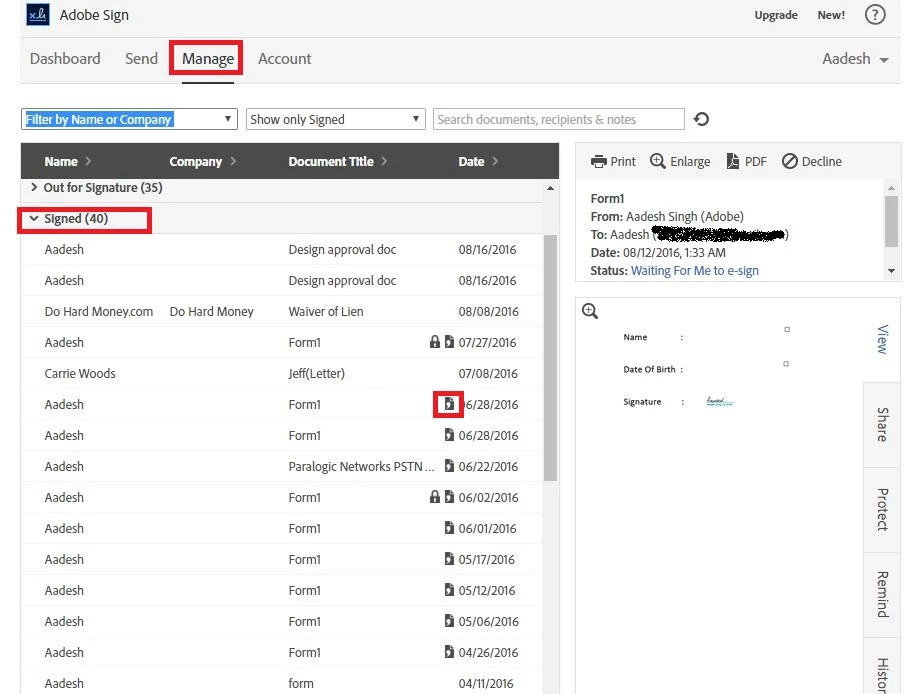
Once the transaction is completed, extract the data using "Has form Data":

Now compare the result.

Regards,

Aadesh

1 reply

AadeshSingh
AadeshSinghCorrect answer
Participating Frequently
April 16, 2017

Hi michelea76241594

Please be informed filling the document through Fill & Sign tool is not part of Adobe Sign.

You need to completely prepare the form in Adobe Sign.

1) Upload the document in Adobe Sign: Create forms

2) Add fields to the document : Adding form fields | Tutorials   &  Field types

3) Assign the field to "prefill" that needs to filled by the sender Prefill Agreement fields before sending  and then add fields for the signer where signer needs to enter the information or sign Assign roles to form fields.

4) Click on send, you will prompted to fill the form in the "Prefill fields" before sending the form to the signer for signature.

Once the transaction is completed, extract the data using "Has form Data":

Now compare the result.

Regards,

Aadesh

MattB68
Participant
September 29, 2017

This method still only downloads a single form of data. How can I get a spreadsheet, CSV file, or other format with ALL of the form data for a specific document, especially if it is filled out through the widget?

MattB68
Participant
September 30, 2017

I should be clear: If I've created a form and many people have filled it out, I currently have to go to each individual document and click the "Has Form Data" icon. However, I will have thousands of these forms filled out. How can I get all of the form data from all of the responses in a single file?