
Participant
July 17, 2025
Answered

All Email Reminder Frequency Options in Power Automate

  • July 17, 2025
  • 2 replies
  • 360 views

There are only two options for the Reminder Frequency when creating an Adobe Sign Template from Power Automate. 
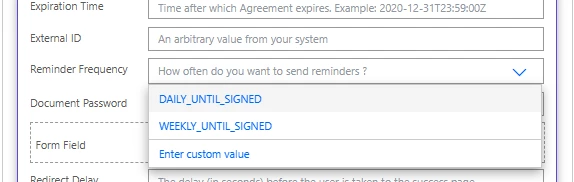
 

But using the portal has 6 options.
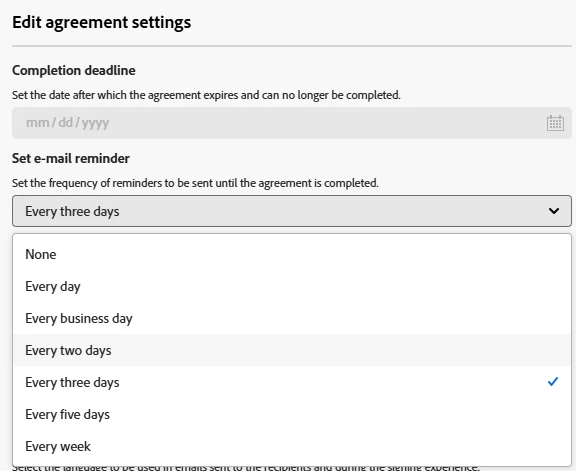
 

To use these options create a Compose action and enter one of the values below:

DAILY_UNTIL_SIGNED
WEEKDAILY_UNTIL_SIGNED
EVERY_OTHER_DAY_UNTIL_SIGNED
EVERY_THIRD_DAY_UNTIL_SIGNED
EVERY_FIFTH_DAY_UNTIL_SIGNED
WEEKLY_UNTIL_SIGNED


Then choose custom value in the Reminder Frequency field and reference the Compose action.

Correct answer Meenakshi Negi

Hi satheesh_5115,


Thank you for reaching out.


We checked that you are using the Adobe Sign Enterprise plan. If you have a similar query, the experts can help you better. Please get in touch with our Adobe Sign Enterprise support team for the correct information. You may contact them using the steps in the following help document: https://adobe.ly/46hS06o. They will be able to help you with the information about the Power Automate integration.

You may also refer to the information in the following help document: https://adobe.ly/44QrD6q.


Thanks,

Meenakshi


2 replies

Participant
July 29, 2025

Have you managed to find the solution for this?

Meenakshi Negi
Community Manager
Meenakshi NegiCommunity ManagerCorrect answer
Community Manager
July 29, 2025

Hi satheesh_5115,


Thank you for reaching out.


We checked that you are using the Adobe Sign Enterprise plan. If you have a similar query, the experts can help you better. Please get in touch with our Adobe Sign Enterprise support team for the correct information. You may contact them using the steps in the following help document: https://adobe.ly/46hS06o. They will be able to help you with the information about the Power Automate integration.

You may also refer to the information in the following help document: https://adobe.ly/44QrD6q.


Thanks,

Meenakshi


Meenakshi Negi
Community Manager
Community Manager
July 18, 2025

Hi Adam-bck,


Thank you for reaching out.


We have checked that you are using the Adobe Sign Enterprise plan. As you have an integration-related question, the experts can best answer it. Please contact our Adobe Sign Enterprise support team for the correct information. You may contact them using the steps in the following help document: https://adobe.ly/46hS06o.

Refer to the following help document for more information on Acrobat Sign Integration: https://adobe.ly/4kNEA5F


Thanks,

Meenakshi