
Question
Applying radio button edits to already existing documents
Hi everyone. I recently noticed when I exported data from an Adobe Acrobat document into an Excel sheet that some of the radio buttons are not coded correctly in the document and no not align with their actual variable number.
For example, variable AS50 on this document has a value of AS51 in the radio button, so it is being exported into the Excel sheet as AS51 rather than AS50. Also, because there are two AS52 radio buttons, only one is getting exported and the other cannot be found in the export.
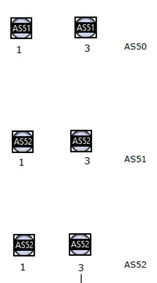
Further, there are some discrepancies in the way some data is getting coded, as well as the locations of some variables, which will need to be amended.
To our knowledge, we can edit the properties and locations of these radio buttons in Adobe; however, we are wondering if there is a way to apply the changes that we make to the Adobe document to all of the already completed/filled out versions of the document. That way, we don't have to manually re-enter all of that data.
The document was created with Adobe Acrobat. To export it, I took the following steps: Tools > Prepare Form > More > Merge Data Files into Spreadsheet > Add Files > Document_Name.pdf > Export
The OS build on the desktop is 17134.2208 and is a 64-bit operating system, and the Acrobat version is 2202.003.20258.
If anyone has any idea of ways to apply these changes to pre-existing documents, please let me know! Any help/ideas are appreciated.


 AdChoices