
Assistance with Text Tag
If this should be in another forum, please let me know.
I am attempting to write the text tags of the following fields as they were initially created in the Adobe Sign UI where they work, but when writing them out as text tags I am having issues.
If anyone can assist me in writing these, I would appreciate it.

1.)DateofBirth – This is used to capture the users DOB in the format listed below.
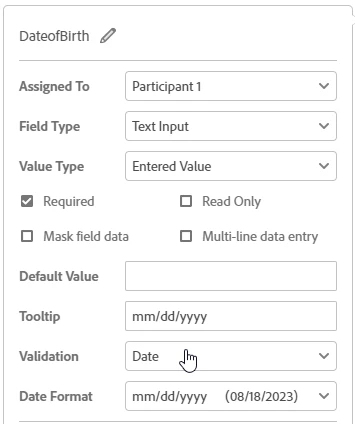
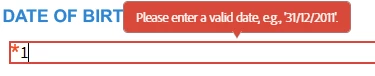
In my HTML document, I am using the following: {{*eaDateOfBirth_es_:signer1:isdate(format=dd/mm/yyyy)}}
It captures information, but please note the red error below noting the valid date should be in dd/mm/yyyy instead of asking for mm/dd/yyyy. How can I make that ask for my requested format?
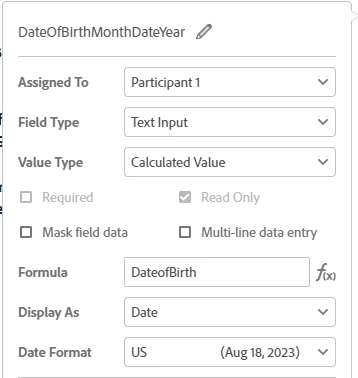
2.) DateOfBirthMonthDateYear – This is used as a read only display of the users DOB. Utilizing a formula calling the first DOB entry and displaying it not in the original mm/dd/yyyy it was entered in, but as you can see, displayed as a date with a date format of US so it displays ex: Aug 18, 2023.
This is the formula I have written out: {{!ea_DOB_MMDDYYYY_es_:calc([eaDateOfBirth_es_]):format(date, "mmmm d, yyyy")}}
How can I get it to display the correct format?
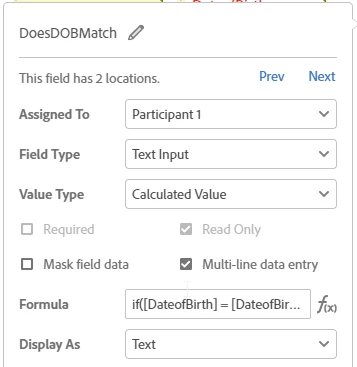
3.)DoesDOBMatch – This is a read only field displaying a calculated value as text. This looks at fields 1 and 4 from the initial image and checks to see if they equal one another. There is no true message, just double quotes, but the false message is noted in the formula.
Field 1 text tag: {{*eaDateOfBirth_es_:signer1:isdate(format=dd/mm/yyyy)}}
Field 4 text tag: {{*eaConfirmDateOfBirth_es_:signer1:isdate(format=dd/mm/yyyy)}}
Text tag for this comparison field: {{!ea_DOBMatch:calc([eaDateOfBirth_es_] = [eaConfirmDateOfBirth_es_],"","Please confirm and correct the DOB as these fields do not match."):font(color=FF0000)}}
How can I get this to display?
Thank you!


 AdChoices