


Participant
February 13, 2018
Answered

Automatically Sending Signed Document to Additional Person

  • February 13, 2018
  • 1 reply
  • 842 views

We currently setup a widget to be signed by our recruiter's client. Once signed by the recruiter's client, we sign and complete the two signer process. The issue is, we want to send an automatic copy of the signed document to the recruiter as well. How do we set this up in the widget?
This topic has been closed for replies.
Correct answer ScottCarter

Greetings!

Provided the Widget is only used for one recruiter, then you can CC that recruiter's email in the design of the Widget.

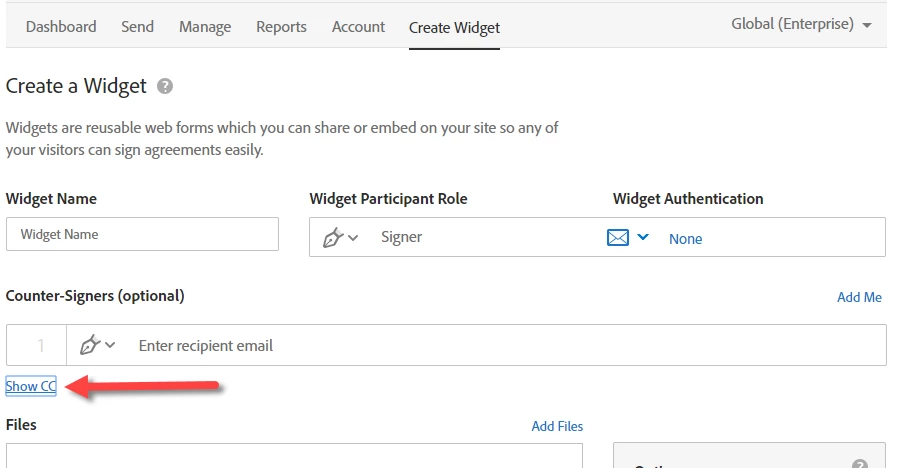
Click the Show CC link (just under the counter-signature field) to expose the CC field, and enter the email address of everyone you want to CC to the Widget agreement

1 reply

ScottCarterCorrect answer
Participating Frequently
February 15, 2018

Greetings!

Provided the Widget is only used for one recruiter, then you can CC that recruiter's email in the design of the Widget.

Click the Show CC link (just under the counter-signature field) to expose the CC field, and enter the email address of everyone you want to CC to the Widget agreement