


Business Process Error while creating an Agreement on MS CRM 2016/Dynamics 365
Hello All,
I have followed the complete process of integrating Adobe Sign with MS CRM. Everything went well and I can see 'Adobe Sign' as part of my CRM now. But, when I go to an agreement, I am receiving the following error:
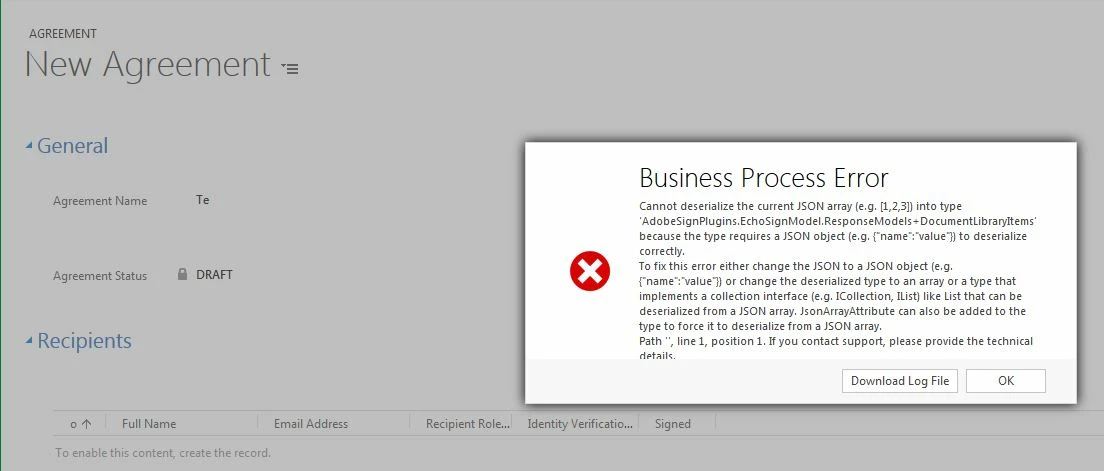
Unhandled Exception: System.ServiceModel.FaultException`1[[Microsoft.Xrm.Sdk.OrganizationServiceFault, Microsoft.Xrm.Sdk, Version=8.0.0.0, Culture=neutral, PublicKeyToken=31bf3856ad364e35]]: Cannot deserialize the current JSON array (e.g. [1,2,3]) into type 'AdobeSignPlugins.EchoSignModel.ResponseModels+DocumentLibraryItems' because the type requires a JSON object (e.g. {"name":"value"}) to deserialize correctly.
To fix this error either change the JSON to a JSON object (e.g. {"name":"value"}) or change the deserialized type to an array or a type that implements a collection interface (e.g. ICollection, IList) like List<T> that can be deserialized from a JSON array. JsonArrayAttribute can also be added to the type to force it to deserialize from a JSON array.
Path '', line 1, position 1.Detail:
<OrganizationServiceFault xmlns:i="http://www.w3.org/2001/XMLSchema-instance" xmlns="http://schemas.microsoft.com/xrm/2011/Contracts">
<ActivityId>e278427f-2cb6-4cce-90d2-d1f326a01e36</ActivityId>
<ErrorCode>-2147220891</ErrorCode>
<ErrorDetails xmlns:d2p1="http://schemas.datacontract.org/2004/07/System.Collections.Generic">
<KeyValuePairOfstringanyType>
<d2p1:key>OperationStatus</d2p1:key>
<d2p1:value xmlns:d4p1="http://www.w3.org/2001/XMLSchema" i:type="d4p1:string">0</d2p1:value>
</KeyValuePairOfstringanyType>
<KeyValuePairOfstringanyType>
<d2p1:key>SubErrorCode</d2p1:key>
<d2p1:value xmlns:d4p1="http://www.w3.org/2001/XMLSchema" i:type="d4p1:string">-2146233088</d2p1:value>
</KeyValuePairOfstringanyType>
</ErrorDetails>
<Message>Cannot deserialize the current JSON array (e.g. [1,2,3]) into type 'AdobeSignPlugins.EchoSignModel.ResponseModels+DocumentLibraryItems' because the type requires a JSON object (e.g. {"name":"value"}) to deserialize correctly.
To fix this error either change the JSON to a JSON object (e.g. {"name":"value"}) or change the deserialized type to an array or a type that implements a collection interface (e.g. ICollection, IList) like List<T> that can be deserialized from a JSON array. JsonArrayAttribute can also be added to the type to force it to deserialize from a JSON array.
Path '', line 1, position 1.</Message>
<Timestamp>2017-04-18T22:40:20.1102447Z</Timestamp>
<ExceptionRetriable>false</ExceptionRetriable>
<ExceptionSource i:nil="true" />
<InnerFault i:nil="true" />
<OriginalException i:nil="true" />
<TraceText>
[AdobeSignPlugins: AdobeSignPlugins.AgreementCreatePlugin]
[50e73f09-fc03-e611-80c5-00505615427d: AdobeSignPlugins.AgreementCreatePlugin: Create of adobe_agreement]
Starting Agreement Create Plugin.
Esign manager initiated.
Starting ManageUserProvisining method.
auto-provison users = true
Calling user email is : EXT_SMS_CRM@
{"httpClient":{"DefaultRequestHeaders":[{"Key":"Connection","Value":["close"]},{"Key":"x-api-client-id","Value":["MSDynamics;v5.0.1.20;Online;Win7;FF"]},{"Key":"Access-Token","Value":["3AAABLblqZhAJYCKQmFc8U1Yv5jTPiLTxu6oOqLiebpBg-RP_n0hjrwWWtHf23BguPUaj6r0FWgpNPsLcmZY9MVE1wfd1fJzV"]},{"Key":"x-api-user","Value":["email:EXT_SMS_CRM@"]}],"BaseAddress":null,"Timeout":"00:01:40","MaxResponseContentBufferSize":2147483647},"baseUrl":"https://api.au1.echosign.com/api/rest/v5"}
Starting transaction performance record creation.
Ending transaction performance record creation.
User Creation response = {"userId":null,"userStatus":null,"message":"A user with the specified email already exists","code":"USER_ALREADY_EXISTS"}
User associated
Ending ManageUserProvisining method.
Starting library documents fetching.
</TraceText>
</OrganizationServiceFault>
Can someone let me a know a fix please?
 AdChoices