jamesb1051389
Participating Frequently
March 13, 2018
Answered

Can a user account be deleted?

  • March 13, 2018
  • 1 reply
  • 1331 views

G'day all, I just got off a very disappointing chat session with one of the Support team, who tells me that a user account can be deleted.

Of course, because it's a developer account, and not a paid account, she was unable to help me at all.

So, in short.

I have created a Developer account.
Added a user account to this and the user was testing.
The customer now wants their own Sign account and we deactivated the user account and tried to register them in the live account.
Nope, an error saying that it is registered elsewhere.

So, in short, how do I get this email address deleted from my developer account so it can be used in the customer's live account??

Are we really expected to create a new email account each time we want a new user to test in the developer environment?

Any answers gratefully accepted!

Cheers!
This topic has been closed for replies.
Correct answer ScottCarter

If you don't have direct access to the userID that you want to change, you can use the Bulk User Edit feature to change the email address yourself.

It's a little more complex, but still 100% in your authority.

There is a help article that explains the feature here: Create or update users in bulk

The basic steps are:

1. Log in as the account admin

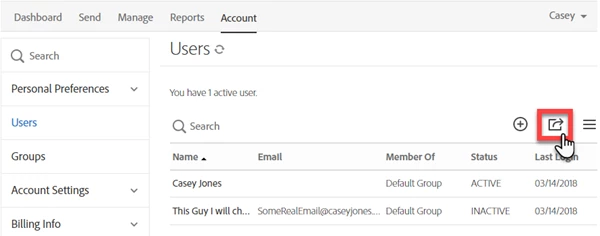
2. Navigate to your Users section and click the Export icon. A CSV will be generated with all your user information

The CSV will have more information than you need. It will look something like this:

3.Edit the CSV to delete all but the first three columns (Email, First name and Last Name)

  • Delete any additional rows also

4. Add a new column with the header value New Email Address

5. In the New Email Address column, but some bogus value

The CSV will look something like this:

6. Save the CSV. Make sure to save it as the file type CSV.

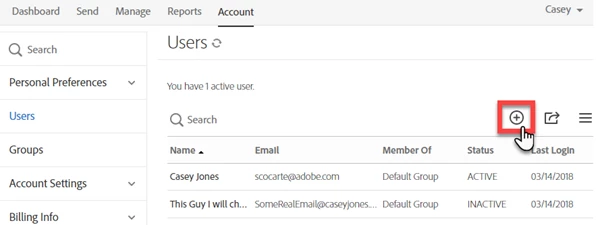
7. Return to the User screen, and click the Add user button

The Create User panel opens.

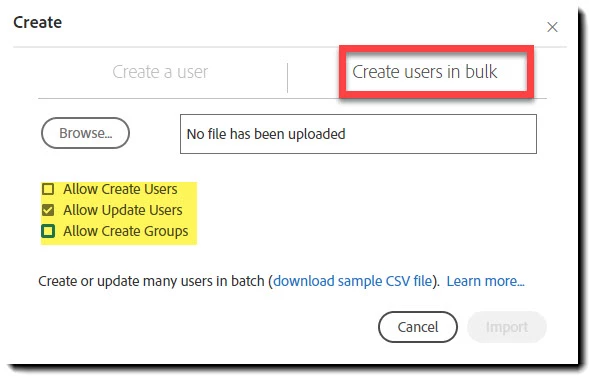
8.Select Create Users in Bulk

  • As a best practice, uncheck the options to create User and Group, because you don't want that...

9. Click Browse, and upload your CSV file

10. Click Import.

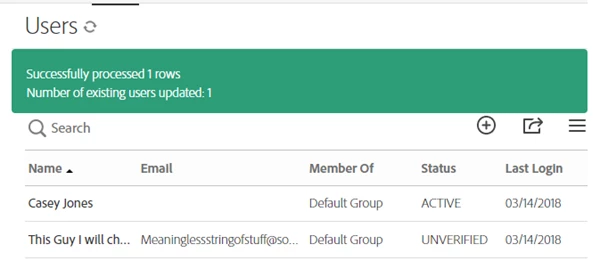
You should get a success message, and if you look at the user in the system, their status will be Unverified (not Inactive), meaning their email address is changed, and not yet verified. (Because it's a bogus email, it can never be verified, but it's a different literal value, and that's the goal)

You should now be able to create a new user with the previous email value.

It feels complex, but once you have done it, it's not bad at all.

1 reply

Participating Frequently
March 13, 2018

Greetings,

The complication you have described (if I'm reading this right), is based in the requirement that email addresses in Adobe Sign are unique. You used an email address to create a trial userID, and now you want to create paid account using that same email address.

The quickest answer to this problem is to log into your existing trial userID, and change the email address.

It's not the most elegant solution, but it is 100% within your control and authority to do.

For example, if the email address on your trial account is Contracts@MyDomain.com, you can change that email to Contracts@MyDomain.com.arc (any bogus, unreachable email pattern will do)

It doesn't matter that you cannot verify this new bogus email address. It's unique and different from the address you want to use.

Once you have submitted the email change request, you will be able to create a new userID with the email address you want to use.

It's not the same as deleting the old userID, but it escapes the uniqueness requirement.

NOTE: IF you change the email address to a bogus value that can never be resolved (like Me@MyDomain.com.arc) you will never be able to access the content on that account again.

Because you are asking for the userID to be deleted, I assume this isn't a problem, but just make sure you have everything you want to retain downloaded before you make the account unavailable.

jamesb1051389
Participating Frequently
March 13, 2018

That might actually help, however the situation is a tiny bit more complicated.

The developer account is mine, with my dev email address.

I invited a user user to the account using their production email account.

From what hat you are saying, if I ask the user to log in, and change their email address in their profile, then I can add them to a new account?

thanks, that might help a lot!

ScottCarterCorrect answer
Participating Frequently
March 14, 2018

If you don't have direct access to the userID that you want to change, you can use the Bulk User Edit feature to change the email address yourself.

It's a little more complex, but still 100% in your authority.

There is a help article that explains the feature here: Create or update users in bulk

The basic steps are:

1. Log in as the account admin

2. Navigate to your Users section and click the Export icon. A CSV will be generated with all your user information

The CSV will have more information than you need. It will look something like this:

3.Edit the CSV to delete all but the first three columns (Email, First name and Last Name)

  • Delete any additional rows also

4. Add a new column with the header value New Email Address

5. In the New Email Address column, but some bogus value

The CSV will look something like this:

6. Save the CSV. Make sure to save it as the file type CSV.

7. Return to the User screen, and click the Add user button

The Create User panel opens.

8.Select Create Users in Bulk

  • As a best practice, uncheck the options to create User and Group, because you don't want that...

9. Click Browse, and upload your CSV file

10. Click Import.

You should get a success message, and if you look at the user in the system, their status will be Unverified (not Inactive), meaning their email address is changed, and not yet verified. (Because it's a bogus email, it can never be verified, but it's a different literal value, and that's the goal)

You should now be able to create a new user with the previous email value.

It feels complex, but once you have done it, it's not bad at all.