Answered
Can Adobe Sign Template be used to make a Web Form?
I have a template I created in Adobe Sign from an uploaded pdf. Is there a way to use that template as the basis for a web form? I don't see a way to do that.

I have a template I created in Adobe Sign from an uploaded pdf. Is there a way to use that template as the basis for a web form? I don't see a way to do that.
Hi Gsmela,
Apologies for the delay in response.
Currently it is not possible to upload a Template (i.e. underlying document + form field layer) as a basis of a webform. However, you are able to add a 'form field layer' i.e. the fields in their respective positions, to an agreement you've uploaded as a webform.
When creating a template, simply save it as either a 'Reusable Form Field layer' or 'Both.'
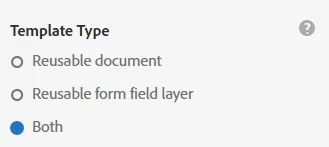
When you subsequently upload a document as a widget, you can then simply add the Fields in their respective positions by adding the form field layer. To do so, simply click on 'Field Template' on the top left-hand corner of your Adobe Sign screen and select the form field template.
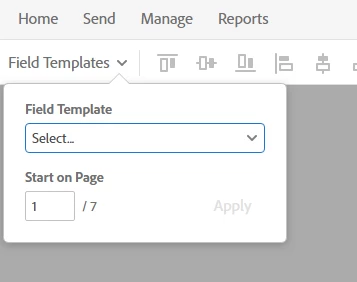
Hope this helps!
Kind regards,
Already have an account? Login
Enter your E-mail address. We'll send you an e-mail with instructions to reset your password.


 AdChoices