Participant
September 14, 2018
Answered

Can I move a template from Adobe Sign Business to Team

  • September 14, 2018
  • 1 reply
  • 350 views

I just switched from Adobe Sign Business pricing to the Team pricing.  I was told by someone in Adobe customer suppor I could not move templates from Business to Team due to a "shard" issue.  I find that hard to believe.  I paid Adobe $500 to develop one of the templates. I would hate to have to do it again.  Does anyone have a workaround?

Thanks,

Jim

This topic has been closed for replies.
Correct answer AkanchhaS8194121

Hey Jimh,

Sorry to hear about the trouble. As your account has already been migrated to Team account from Business. So we would suggest you to directly contact to out Adobe Sign billing support team. As there is a possibility that the team might have access to your previous archived data or they could access the data.

You may check the private message where I have shared the support contact number and the direct email for Adobe Sign support team.

Or you can directly contact to support from your Adobe Sign account itself-

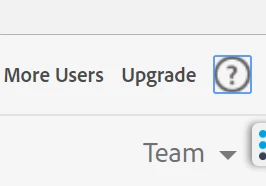
1- Click on the ? icon at upper right corner, as shown in picture below

2- It would take you to your support option page.

Hope this helps.

Regards,

Akanchha

1 reply

AkanchhaS8194121
AkanchhaS8194121Correct answer
Legend
September 14, 2018

Hey Jimh,

Sorry to hear about the trouble. As your account has already been migrated to Team account from Business. So we would suggest you to directly contact to out Adobe Sign billing support team. As there is a possibility that the team might have access to your previous archived data or they could access the data.

You may check the private message where I have shared the support contact number and the direct email for Adobe Sign support team.

Or you can directly contact to support from your Adobe Sign account itself-

1- Click on the ? icon at upper right corner, as shown in picture below

2- It would take you to your support option page.

Hope this helps.

Regards,

Akanchha