

Adobe Employee
June 29, 2021
Question

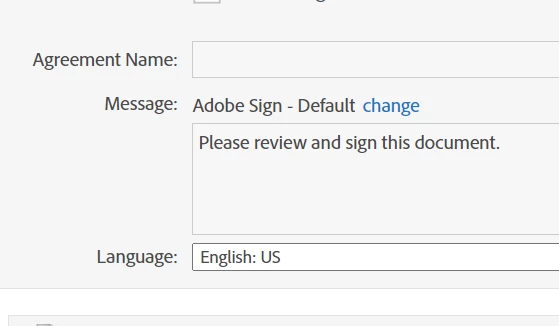
Cannot add "Agreement Name" to Send in Bulk document

  • June 29, 2021
  • 1 reply
  • 424 views

I'm trying to send a document via the Send in Bulk funtction and I cannot get the "Agreement Name" field to allow edits. Its always greyed out and blank. 

I've sent using this function or Mega Send before and never had a problem. I've tried advancing without a name and I get an error that won't allow me to process the document. 
 

This topic has been closed for replies.

1 reply

Meenakshi_Negi
Legend
June 30, 2021

Hello,


Thank you for reaching out and sorry for the trouble.


Could you please confirm if you are still experiencing the issue?

If yes, please try using an alternate browser or a new incognito window on Chrome. Clear the cache and cookies from the browser.


Let us know if the issue persists.


Thanks,

Meenakshi

Participant
June 30, 2021

Hi!

Yes, I am still experiencing the issue. 

My team and I have tried 3 different accounts, different computers, different browsers, incognito windows and none of it resolves the issue. 


Thank you for your help. 

Meenakshi_Negi
Legend
July 1, 2021

Hello,


Sorry for the trouble.


We have tried to replicate the behavior and it is working fine. 

It seems that the option "Allow sender to add agreement name" is disabled by admin under Account > Account Settings > Send Settings.


Let us know if you need any help.


Thanks,

Meenakshi

[Edited response]