

Jimmity Jamst
Inspiring
November 12, 2021
Question

Copy of Signed Agreement, sent to all recipients - by template used

  • November 12, 2021
  • 1 reply
  • 523 views

Hello all,

In Account / Account Settings / Global Settings, we have the option to select an option under 'Attach a PDF copy of the signed document in emails sent to'
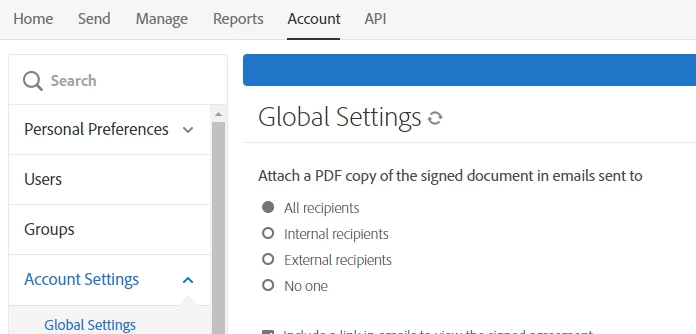
I was wondering if it's possible to set this on a template by template basis, rather than globally.

My use case is: I send a quote for a service to a customer, which they can then approve or decline. If they approve, I then send an order form to them to sign. I use one template for the quote, another for the order form. I would like them to receive a final copy of the signed order form (signed by them and by me) but I do not want them to receive a final copy of the quote after they've approved it. It's a little misleading because of the wording: 'Attached is the final agreement...', 


Is there a way to achieve this, or failing that, do I have the option to change the wording in the email wrt the final agreement?


Thank you.

This topic has been closed for replies.

1 reply

Legend
November 16, 2021

One thing to consider is that for for the quote the participant is set to an Approver role, or Acceptor role instead of the default Signer role. This changes the verbiage in the emails a bit.


This setting cannot be set per template, but can be set on a group level.

if users in multiple groups is enabled then you can assign the sender to 2 groups. One for the quote and one for the order form.

Se the quote group to not include attachments and the order form to include them.


On the send page select the group required for each tempalte or do this via a Sign workflow.


A more advanced option is to use the API where you can control this on the agreement level.

Jimmity Jamst
Inspiring
November 17, 2021

Hi Simon,

Thank you for your reply. I was first exploring if this can be achieved 'manually' within Adobe Sign. Ultimately I am generating agreements from ServiceNow, using this integration app that sits within ServiceNow: https://helpx.adobe.com/sign/using/servicenow-integration-installation-guide.html

I don't think I'm able to achieve this via that integration (though I appreciate it's possible with the 'naked' API).


Thanks

Jamie