


Participant
October 25, 2017
Answered

custom fields

  • October 25, 2017
  • 1 reply
  • 2365 views

I would like to create a custom field that I can drag and drop into a document.

That custom field would include numerous other fields.

example.

credit card #, SEC code, EXP, signature.

I cannot build a standard template as I require the document that I drop it into to change every time.

but do not want to in put each field each time.

thoughts!!

thank you !

Paul
    This topic has been closed for replies.
    Correct answer SimonATS

    to continue on from form field layer templates,

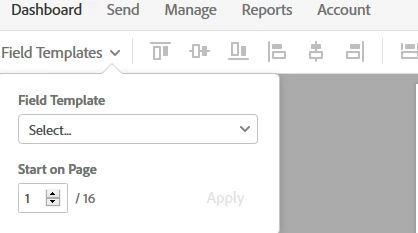
    in your step 3 during the editing phase you have the option to apply a form layer template:

    again though i think it requires a business or higher plan to have this feature.

    Another option is to use tags in the document itself. You can markup word and pdf files with special tags (text based) or Acrobat form fields as well in case of PDF files. When such files are processed by Adobe sign the tags are converted to fields.

    Create forms

    1 reply

    Legend
    October 25, 2017

    possible using form field layer templates. When create a library template you'll see this option, though I believe this requires an Adobe Sign plan of a certain level.

    (it's part of the free trial)

    Participant
    October 25, 2017

    Hi Simon,

    just to be clear as I am having a hard time implementing this.

    I will have constantly changing PDF's to send out.

    I need those PDF's to include approx. 5 standard fields that I need to drop into the PDF every time.

    The goal is to send 1x PDF rather than the PDF + a document with fields.

    I however do not want to rebuild all the fields on the changing PDF.

    so how do start the process.

    1) choose who I am sending this to.

    2) drop in the PDF

    3) get ready to send which puts be in the editing phase.

    4) THIS IS WHERE I NEED TO ADD THE 5 FIELDS...HOW DO I DO THAT?

    thank you!

    SimonATSCorrect answer
    Legend
    October 26, 2017

    to continue on from form field layer templates,

    in your step 3 during the editing phase you have the option to apply a form layer template:

    again though i think it requires a business or higher plan to have this feature.

    Another option is to use tags in the document itself. You can markup word and pdf files with special tags (text based) or Acrobat form fields as well in case of PDF files. When such files are processed by Adobe sign the tags are converted to fields.

    Create forms