



Answered
Date fields on eSign not being populated when document is PDF
Hello Adobe Support,
I am experiencing inconsistent behavior with signature and date form fields when sending documents for e-signature. Below is a detailed description of the issue.
1. Word Document Behavior (Working as Expected)
When I send a Word document containing the following fields:
- Signature field (
{{Sig1_es_:signer1:signature}}) - Date field (
{{Date1_es_:signer1:date}})
…the behavior is correct:
- The signature field is editable and functions normally.
- The date field is automatically populated at the moment of signing.
- ✔️ Everything works correctly here.
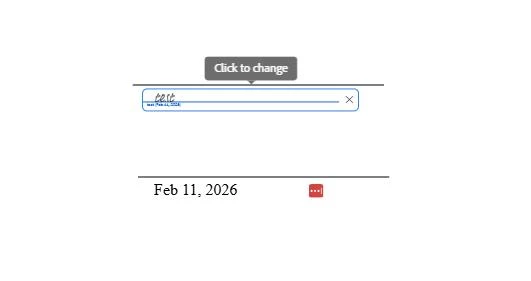
2. PDF Document Behavior (Not Working)
When I send a PDF document containing the same field tags, the behavior changes:
A. Signature Field as Text → Wrong behavior
- If I send the signature as a text field, the signature is placed in the wrong location (appears in the first empty space on the page, and also Email data is added).
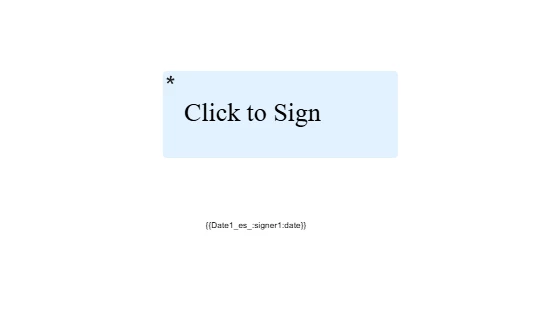
- The date field is never populated, regardless of field type.
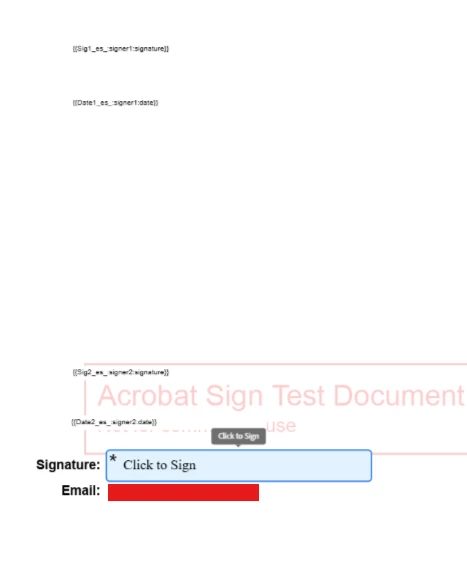
B. Signature Field as 'Signature' Type → Correct placement
- If I use a signature-specific field, the signature is placed correctly.
- ❌ However, the date field still does not populate, whether it is added as a text field or a date field.
Summary of the Problem
| Document Type | Signature Field | Date Field |
|---|---|---|
| Word | Works correctly | Auto-populates when signing |
| PDF (text field signature) | Signature placed incorrectly | Date never auto-populates |
| PDF (signature field) | Signature placed correctly | Date still never auto-populates |
What I Need Help With
Could you please clarify:
- Why does the date field auto-populate in Word documents but not in PDFs using the same tag format?
- What is the correct tag or field type to use in PDF to ensure the date of signing is automatically populated?
- Do PDFs require a different tag structure for date auto-population?
- Is this a known limitation or a configuration issue?

 AdChoices