


Participant
January 16, 2018
Answered

Dead Hyperlinks in Signature Screen

  • January 16, 2018
  • 1 reply
  • 782 views

I have Adobe Pro DC and send estimates to my customers to sign. The estimates contain hyperlinks to web documents the customer needs to see before signing.

However, in Adobe's signature screen, what my customer sees, the links are dead. My question is if it's possible to have live hyperlinks in the signature screen. See below: this is the screen my client sees and here is where the links are dead. Tech support told me the client has to download the document, then they can click on the links, then they have to come back and sign it. It sincerely defeats the purpose of making it easy for clients to sign for work. I am open to any and all suggestions, however.
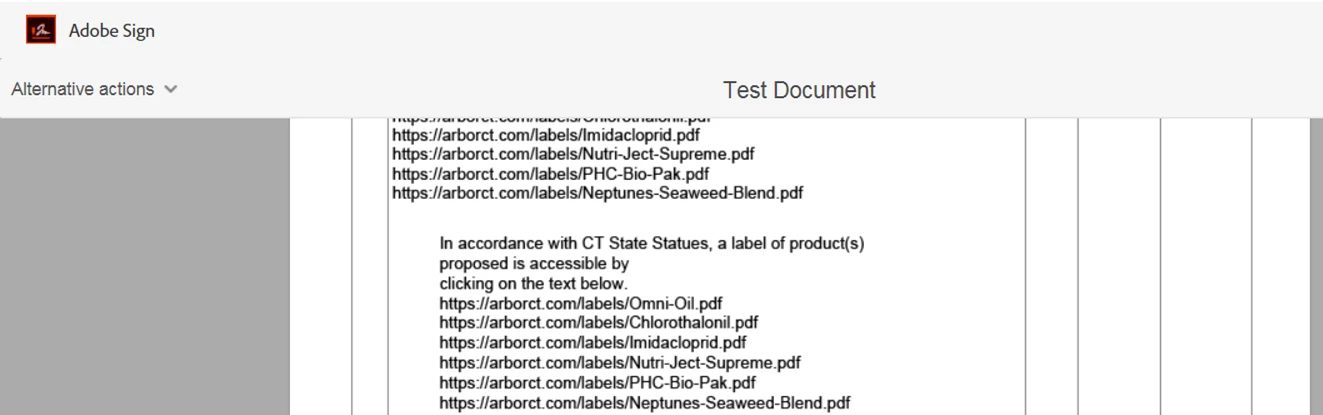
THank you,

~~~Joslyn Pollock

This topic has been closed for replies.
Correct answer Meenakshi_Negi

Hi Jp,

I see that you have the Adobe Acrobat Pro DC subscription which include the Adobe SIgn individual account.

Sorry to say that it is not possible in the Adobe Sign individual account.

You need to upgrade the account to Enterprise.

I would also suggest you to contact support once to check if they can suggest you anything on this.

Please refer the steps mentioned below to contact them:

  • Login your adobe sign account directly via https://secure.echosign.com/public/login
  • Once logged in, check the upper right corner of the page and click the question mark icon.
  • It will redirect you to the page where you can find the option either to create a support case or contact the team.
  • If you've never logged in this way, use the forgot password option on the login link to set your password.
  • Once you are logged in, use the steps mentioned above.

Hope this will help.

Let us know if you have any questions.

Regards,

Meenakshi

1 reply

Meenakshi_Negi
Meenakshi_NegiCorrect answer
Legend
January 19, 2018

Hi Jp,

I see that you have the Adobe Acrobat Pro DC subscription which include the Adobe SIgn individual account.

Sorry to say that it is not possible in the Adobe Sign individual account.

You need to upgrade the account to Enterprise.

I would also suggest you to contact support once to check if they can suggest you anything on this.

Please refer the steps mentioned below to contact them:

  • Login your adobe sign account directly via https://secure.echosign.com/public/login
  • Once logged in, check the upper right corner of the page and click the question mark icon.
  • It will redirect you to the page where you can find the option either to create a support case or contact the team.
  • If you've never logged in this way, use the forgot password option on the login link to set your password.
  • Once you are logged in, use the steps mentioned above.

Hope this will help.

Let us know if you have any questions.

Regards,

Meenakshi