Participant
September 25, 2018
Answered

Delete Signature request

  • September 25, 2018
  • 1 reply
  • 976 views

I have a member that is signing a hard copy, how do I remove him from signature group so the signature flow goes to the next person

    This topic has been closed for replies.
    Correct answer AkanchhaS8194121

    Hey Joyd,

    To proceed further, we would require more information from you. I can not find any subscription registered to your account. Are you referring to the Adobe Sign service? If this is the case then you may refer to the steps below and can modify the group setting, only when you are the Admin of the group created.

    1- You may Sign In to the Adobe Sign account https://secure.echosign.com/public/login

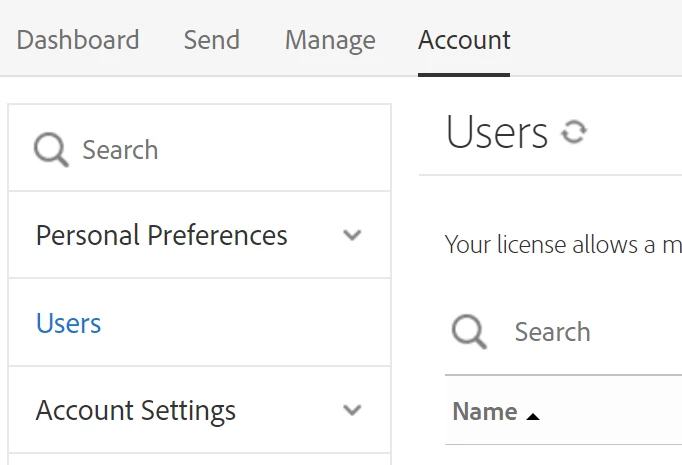
    2- Go to Accounts tab and select "Users"

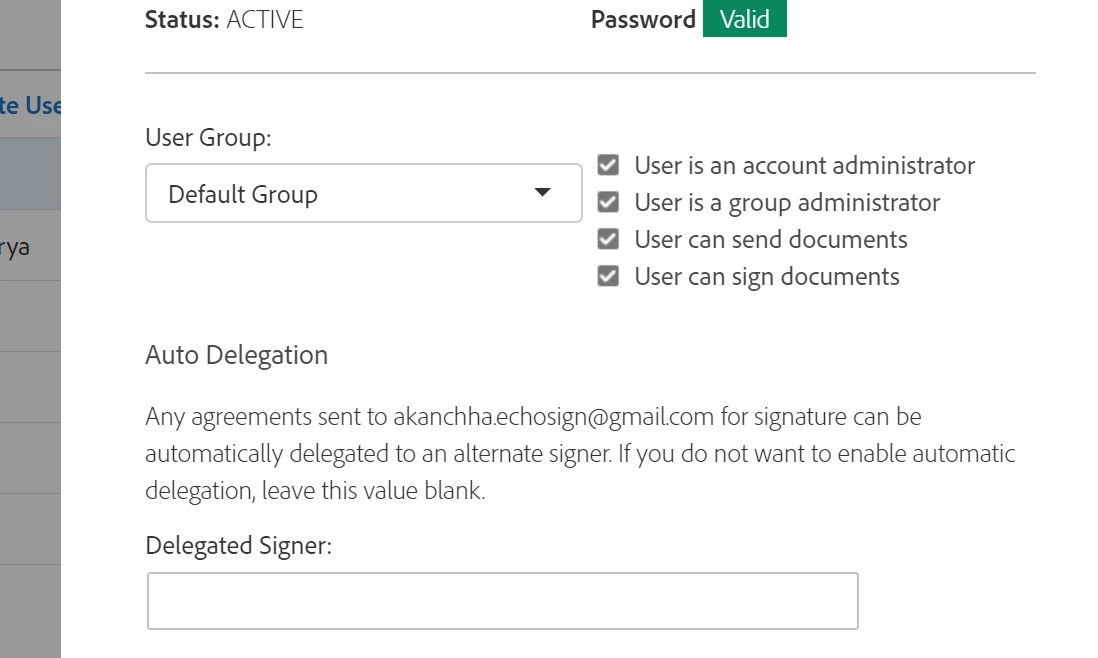
    3- Select the user for whom you want to change the setting. You can deselect "User can sign the document"

    You can also refer to the help article here-  Create and manage groups | 

    Regards,

    Akanchha

    1 reply

    AkanchhaS8194121
    AkanchhaS8194121Correct answer
    Legend
    September 26, 2018

    Hey Joyd,

    To proceed further, we would require more information from you. I can not find any subscription registered to your account. Are you referring to the Adobe Sign service? If this is the case then you may refer to the steps below and can modify the group setting, only when you are the Admin of the group created.

    1- You may Sign In to the Adobe Sign account https://secure.echosign.com/public/login

    2- Go to Accounts tab and select "Users"

    3- Select the user for whom you want to change the setting. You can deselect "User can sign the document"

    You can also refer to the help article here-  Create and manage groups | 

    Regards,

    Akanchha