
Participant
December 15, 2022
Question

Delete Signed Agreements and Archived Agreements

  • December 15, 2022
  • 1 reply
  • 762 views

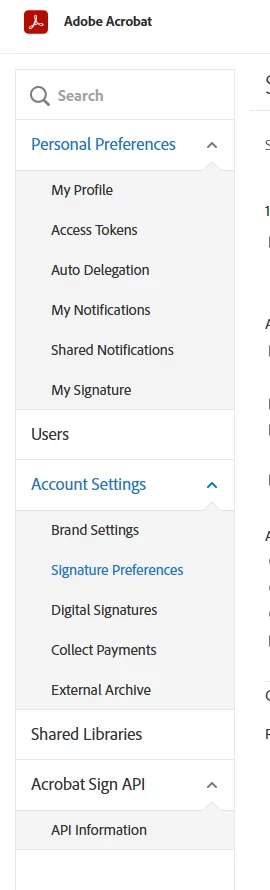
Hi. I need to delete all the signed and archived agreements from my account.  I do not have a the privacy option as indicated at settings > signatures > privacy (see image). How do I delete the documents as they have private information in them? I have the Adobe Creative Cloud plan with access to all of the Adobe apps. Please help. I have gone through posts but none of the instructions match my settings.
 

This topic has been closed for replies.

1 reply

Meenakshi_Negi
Legend
January 2, 2023

Hi BOLD Church,


Thank you for reaching out, and sorry about the delay in response.


In the screenshot, a "Users" option indicates that you are using the Acrobat Sign team plan. 

In that case, you will need to check with the account administrator. 

You may also refer to the information provided in the following help document: https://helpx.adobe.com/sign/kb/to-delete-a-document-from-manage-Page.html.


Let us know if you need any help.


Thanks,

Meenakshi