

marietp73198285
Participant
March 31, 2021
Question

Doesn't allow to create a PDF

  • March 31, 2021
  • 1 reply
  • 509 views

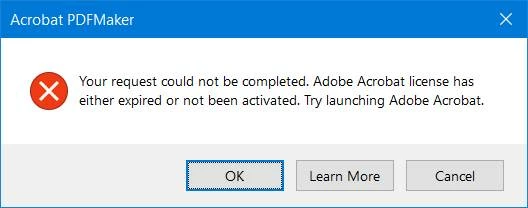
Whenever i want to create a PDF of Word or PPT doc, it gives me this message:
"Your request could not be completed. Adobe Acrobat license has either expired or not been activated."

The only time it does create a PDF is if I close Adobe and start it again, which is time consuming and a little irritating.  Your assistance is appreciated. 
(I'm a paid-up licensed ADOBE User)
 

This topic has been closed for replies.

1 reply

Meenakshi_Negi
Legend
March 31, 2021

Hi Marietp,


Thank you for reaching out and sorry for the trouble.


As you are receiving the error message when creating PDF from Word or PPT files, please sign out of the Acrobat Pro DC application and reboot the machine.

Then relaunch the Acrobat and sign in using your Adobe ID. Now check if you can convert the Word and PPT to PDFs without any issues.


Let us know if the issue persists.


Thanks,

Meenakshi


marietp73198285
Participant
April 7, 2021

Thank you for your reply, but that doesn't solve my problem on a long-term basis. 

I do logg off and reboot my machine every time it happenes to rectiry the problem.

I think my problem is that i leave my laptop on for too many days on end and need to logg off every day.

I will get into the habbit of doing that and then i'm sure the problem will resolve itself. 

Thanks again.

Meenakshi_Negi
Legend
April 7, 2021

Thank you for sharing the information.


It is always suggested to log off the machine every day. That really helps.

However, if the issue still occurs, you may try uninstalling the application using the cleaner tool (https://www.adobe.com/devnet-docs/acrobatetk/tools/Labs/cleaner.html). After that reboot the machine and try installing the application from this link: https://helpx.adobe.com/download-install/kb/download-install-acrobat-subscription.html 


Let us know if you need any help or experience any issues.


Thanks,

Meenakshi