


EchoSign - default notifications
Dear users,
I have a process in which I need to send documents to end-users for Approval. In this process, the following notifications are sent
- 1st notification - informing the recipient that there is a document to approve
- 2nd notification - informing the sender and recipient that 'an agreement has been approved'
the subject fields and body of the notifications are default, and I can't find a way to modify them (with an exception of the 'message from a sender' tag). Especially the 2nd default notification is confusing - it says:
______________________________________________________________________________________________________________________________________
Your Pit Form for 2015 has been Approved by ZZ Company and Michal Brown!
From: Adam Smith (ZZ Company)
To: Michal Brown and Adam Smith
Attached is a final copy of Your Pit Form for 2015.
Copies have been automatically sent to all parties to the agreement.
You can view the document in your Adobe Document Cloud account.
Why use Adobe Document Cloud:
- Exchange, Sign, and File Any Document. In Seconds!
- Set-up Reminders. Instantly Share Copies with Others.
See All of Your Documents, Anytime, Anywhere.
_____________________________________________________________________________________________________________________________________________________________
and I'd like to get rid of the default part of the message (I marked it in red above) and be able to modify the subject to e.g. 'Thank you for approving your Pit Form for 2015' (this the document name)
On top of that, when users receive notifications from Adobe Echo Sign the pictures are not automatically downloaded. Below the 'look and feel' of this notification
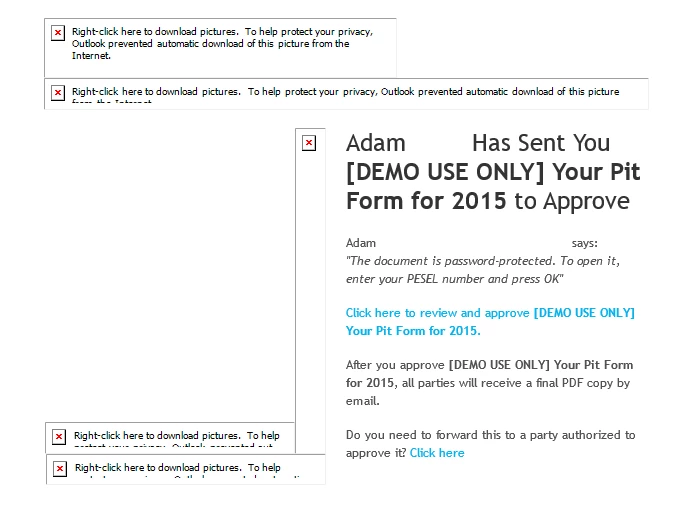
So I am wondering how to work around this.
Ideal solution would be to use my own template for the notification, in which I am stating what I want, give the subject I want, and pictures that look like pictures and do not require the user to right click and download them
Can you please share your thoughts on this topic?
thanks,
Michal
 AdChoices