Megabooth
Participant
April 18, 2017
Answered

Emails not coming through

  • April 18, 2017
  • 3 replies
  • 5189 views

I'm trying to send files to be signed through Adobe Sign but the recipients don't seem to be receiving it?  I've tested with my own emails but nothing is coming through. The service worked last week and the emails came through from echosign@echosign.com. As far as I can see nothing has changed in the back end  - could the issue be an internal one?

I would appreciate any help!

Thanks,

Darren

This topic has been closed for replies.
Correct answer AkanchhaS8194121

Hello Everyone,

We apologize for not being able to address your query on time.

As shared above, this might be a reason for the document is waiting for "Prefil". It's by design. The role is called prefil by sender', so when the sender signs first, the prefill stage is skipped as it's not needed as the sender can fill these fields when they are signing first.

Prefill is a special sender role which allows senders to fill out fields before sending the agreement. This allows senders to fill these fields prior to sending without needing to be either a signing party in the agreements, or allows them to sign last.

Its an optional step that need to be unchecked when sending the document for signature. Refer to this help article Prefill Agreement fields before sending
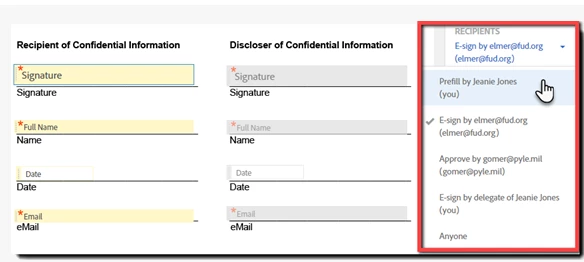
And the similar discussion where correct answer is given- Waiting For Me to Prefill

Regards,

Akanchha

3 replies

AkanchhaS8194121
AkanchhaS8194121Correct answer
Legend
November 28, 2018

Hello Everyone,

We apologize for not being able to address your query on time.

As shared above, this might be a reason for the document is waiting for "Prefil". It's by design. The role is called prefil by sender', so when the sender signs first, the prefill stage is skipped as it's not needed as the sender can fill these fields when they are signing first.

Prefill is a special sender role which allows senders to fill out fields before sending the agreement. This allows senders to fill these fields prior to sending without needing to be either a signing party in the agreements, or allows them to sign last.

Its an optional step that need to be unchecked when sending the document for signature. Refer to this help article Prefill Agreement fields before sending

And the similar discussion where correct answer is given- Waiting For Me to Prefill

Regards,

Akanchha

lb71838484
Participant
April 24, 2017

I have a similar question except that mine are reminders that are not being received.

Megabooth
MegaboothAuthor
Participant
April 18, 2017

I solved one part of the problem and that is the document saved is going out and then waiting for me to prefil rather than going direct to the recipient - how can i make this just out for signature? As mentioned this service was working without issue last week

.

Thanks again.

Darren

wrtd52955545
Participant
September 7, 2018

Has anyone solved this issue yet? I am having the same problem

