
Participant
July 14, 2020
Answered

Error received when trying to replace a signer

  • July 14, 2020
  • 2 replies
  • 4472 views

When trying to replace a signer I received the following error message:

Your account admin does not allow delegation to this individual.

Details

User cannot perform delegation to the specified email address. SETTINGS_PROHIBIT

The email I am replacing with is an internal employee of the company and has signed many documents previously.

Any ideas on how to fix this?
This topic has been closed for replies.
Correct answer Francis5FC3

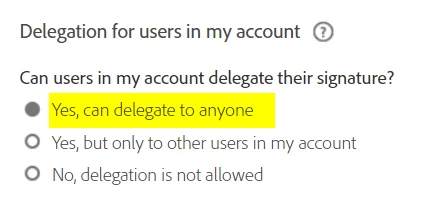
Fo the record, I just came across the same issue and Adobe Sign Support gave me the solution:

Under Account Settings > Global Settings, set this to this value to allow the delegation. It constrains the sender as well, not juste the signer, which was confusing to me.


2 replies

Participant
April 19, 2022

It could be related to Limited Document Visibility https://helpx.adobe.com/in/sign/using/limited-document-visibility.html


Can I replace a recipient?
Replacing a recipient works the same as normal with one exception:

The Sender of the agreement may not replace themselves when they are a listed recipient with a non-signing role, and Signers and CCs in my account will see all files is disabled

Francis5FC3Correct answer
Participant
October 14, 2021

Fo the record, I just came across the same issue and Adobe Sign Support gave me the solution:

Under Account Settings > Global Settings, set this to this value to allow the delegation. It constrains the sender as well, not juste the signer, which was confusing to me.


sascham57077660
Participant
September 15, 2023

It seems that this option is not available anymore...?