



Ashley32593826vphy
Participant
June 2, 2026
Question

Error Received When Trying to Replace Signer

  • June 2, 2026
  • 1 reply
  • 12 views

I tried to replace a signer and received the following error message (Image 1). I saw there was a similar post from 5 years ago, and the solution was to make a change under Account Settings > Global Settings (Image 2), but I do not see this settings option anymore. Please advise.
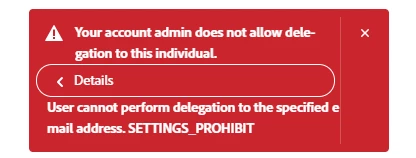
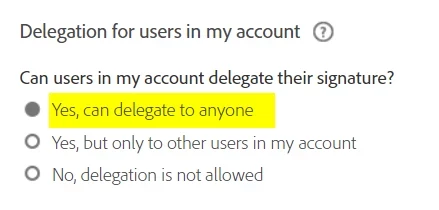
Image 1 - my error message
Image 2 - solution from 5 years ago


    1 reply

    Community Manager
    June 3, 2026

    Hi ​@Ashley32593826vphy


    Thank you for reaching out to the Adobe Community!

    The error you are seeing:

    "Your account admin does not allow delegation to this individual. User cannot perform delegation to the specified email address. SETTINGS_PROHIBIT"

    is triggered by your account's delegation restriction settings. This is can be configured — the setting has simply been moved in the updated Adobe Acrobat Sign interface.


    To configure this setting, you must be an Account Admin or Group Admin. Navigate to:

    Account Settings > Global Settings > Delegation for users in my account

    Set the option to: "Yes, can delegate to anyone"

    ⚠️ Note: Changing this setting does not affect agreements that are already in progress (in-flight). Adobe

    This setting can be configured at both the account level and the group level. Group-level settings will override account-level settings if they differ. Adobe


    Let us know if you have further questions.


    ~Tariq