


kotteeswaranv24339851
Participant
July 26, 2018
Answered

esign document sender mail change

  • July 26, 2018
  • 1 reply
  • 3627 views

I am new to adobe esign process.
I need to implement the adobe esign API into my process.
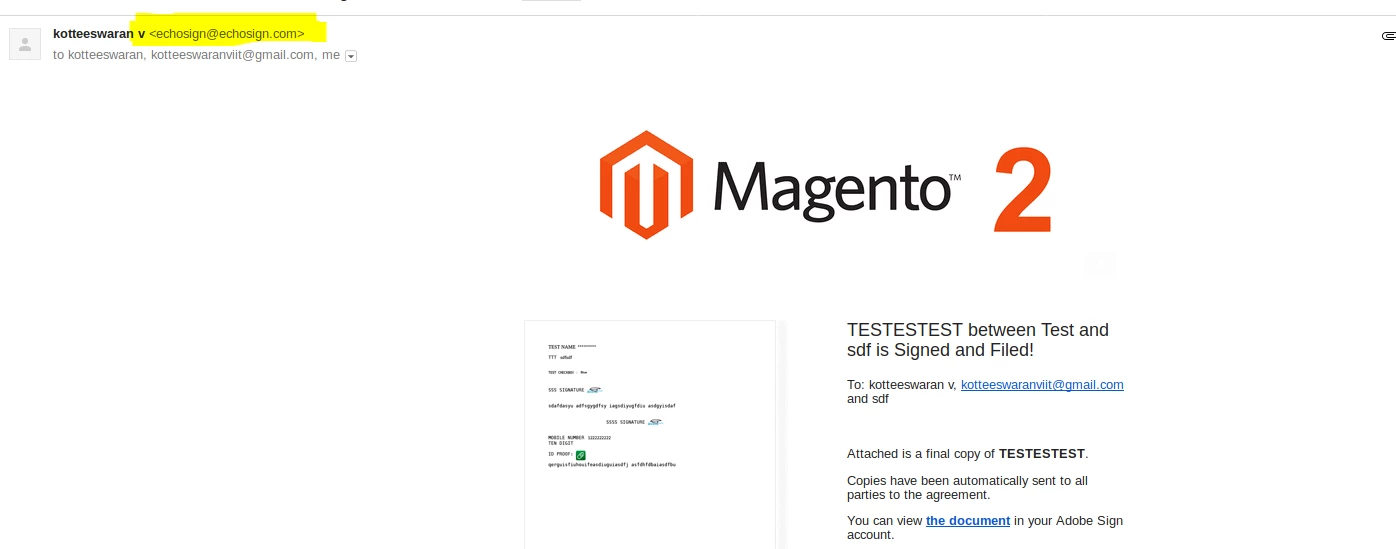
I need to update or change the sender mail.

echosign@echosign.com

It is possible to update the sender mail using API or any account setting.
[Here is the list of all Adobe forums... https://forums.adobe.com/welcome]

[Comments is to ask about the operation of the Forum, not a specific program]

[Moved from the Comments forum to the Adobe Sign forum... Mod]

This topic has been closed for replies.
Correct answer Meenakshi_Negi

Hi Kotteeswaranv,

Sorry for the delay in response.

It is not possible to make any changes to that email address as you send the document from Adobe Sign.

When you send a document for signature, it will also show your username with the Adobe sign email address.

If you have any API related queries, please contact the support team.

For the subscribed account, find below the steps to contact support:

• Login to your Adobe Sign account directly via Sign In — e-signature and e-sign Software Solution — Adobe Sign.

• Once logged in, check the upper right corner of the page and click the question mark icon.

• It will re-direct you to the page where you get the option to create the support case or to start a chat with the team.

• If you've never logged in this way, use the forgot password option on the login link to set your password.

Let us know if you need any help.

Regards,

Meenakshi

1 reply

Meenakshi_Negi
Meenakshi_NegiCorrect answer
Legend
August 1, 2018

Hi Kotteeswaranv,

Sorry for the delay in response.

It is not possible to make any changes to that email address as you send the document from Adobe Sign.

When you send a document for signature, it will also show your username with the Adobe sign email address.

If you have any API related queries, please contact the support team.

For the subscribed account, find below the steps to contact support:

• Login to your Adobe Sign account directly via Sign In — e-signature and e-sign Software Solution — Adobe Sign.

• Once logged in, check the upper right corner of the page and click the question mark icon.

• It will re-direct you to the page where you get the option to create the support case or to start a chat with the team.

• If you've never logged in this way, use the forgot password option on the login link to set your password.

Let us know if you need any help.

Regards,

Meenakshi