
Inspiring
April 10, 2025
Answered

Font Rendering Behavior for Date Field using Adobe Text Tag

  • April 10, 2025
  • 1 reply
  • 250 views

Hi,

I have placed a text tag in the pdf document that is sent for signature: {{Dte1_es_:signer1:date:font(name=Verdana,size=15)}} for the date field. When I open the agreement from the email, the font name and size appear exactly as specified.
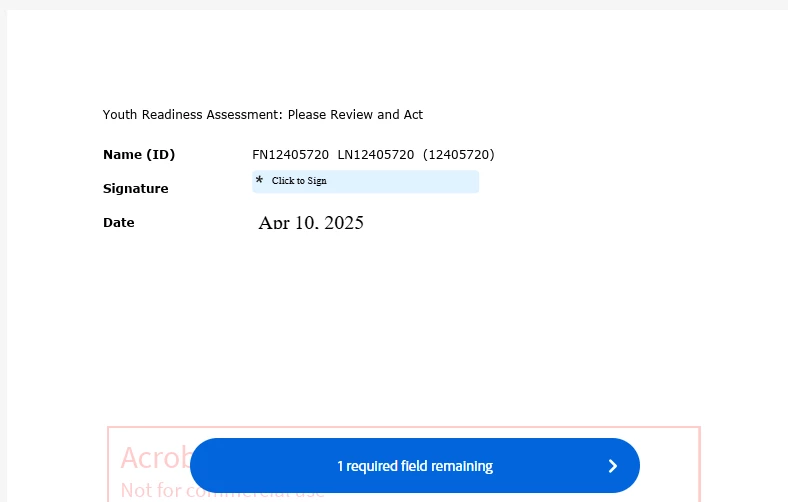
 

Once I download the document after the signing it is coming with a different font. Please find below. Why the font is different ?
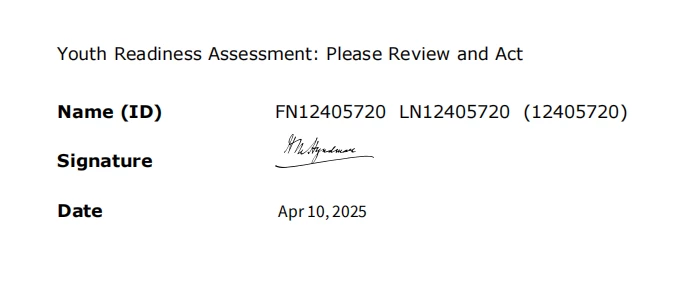
Please let me know a solution to fix this.


Thanks,

Sreejesh

Correct answer Meenakshi_Negi

Hi sreejesh_5190,


Thank you for reaching out.


There are set fonts available in Acrobat Sign. Please refer to the information in the following help document: https://adobe.ly/4lyQYrV

For information-related text-tags, refer to the following help document: https://adobe.ly/4lniMzr


We have checked that you are using the Acrobat Sign Developer service, so we are moving this thread to the Acrobat Sign Developer board for visibility.

With the developer account, you may also contact the pre-sales team. They will be able to provide you the pre-sales technical assistance and share the correct information.
Please refer to the following link to contact them: https://adobe.ly/4ihDPR9. You may use the Contact Us button for Adobe Sign Solutions under the team tab.


Thanks,

Meenakshi

1 reply

Meenakshi_Negi
Meenakshi_NegiCorrect answer
Legend
April 11, 2025

Hi sreejesh_5190,


Thank you for reaching out.


There are set fonts available in Acrobat Sign. Please refer to the information in the following help document: https://adobe.ly/4lyQYrV

For information-related text-tags, refer to the following help document: https://adobe.ly/4lniMzr


We have checked that you are using the Acrobat Sign Developer service, so we are moving this thread to the Acrobat Sign Developer board for visibility.

With the developer account, you may also contact the pre-sales team. They will be able to provide you the pre-sales technical assistance and share the correct information.
Please refer to the following link to contact them: https://adobe.ly/4ihDPR9. You may use the Contact Us button for Adobe Sign Solutions under the team tab.


Thanks,

Meenakshi

Inspiring
April 11, 2025

Thanks